Housing association software where charges, invoices and accounting are one workflow.
Saldofy housing association software is a management module for Estonian apartment associations (korteriühistu) and building associations, built on full accounting. Buildings, apartments, owners, meters and charge rules produce the monthly charge run, the confirmed charge run creates each apartment's invoice with its ledger entry, and residents see their invoices, debt and readings in the resident portal or the mobile app.
Who it is for and what problem it solves.
In many Estonian apartment associations the end of the month looks like this: residents send water readings by e-mail or text message, a board member types them into a spreadsheet, works out the maintenance fee and repair fund per apartment and makes the invoices in a separate program. The accountant enters the same invoices again, bank payments are matched by hand and the list of debtors lives in a third file. Every change of owner or price means correcting the spreadsheet from the right month onwards.
Saldofy suits an association whose board does the work itself, an association with a hired manager and the accountant who keeps the association's books. An apartment association is a legal person that needs a chart of accounts, bank entries and an annual report like any other company. That is why the housing module is not a separate program but part of Saldofy accounting: the invoice, the payment and the entry come from the same place.
How an association gets started in Saldofy.

Open “Set up your housing association” and choose your association from the Business Register (Äriregister). Saldofy checks that you are a board member and offers the building and apartment data from the Building Register (Ehitisregister). If the register query fails, you continue by hand.

Add apartments and residents with the bulk import: download the CSV template, fill it in and review the preview. One row adds a resident and an ownership with the owner's share of the apartment (for example 0.5 is half); the apartment's notional share comes from the apartments file; the same e-mail address links one resident to several apartments.

Add meters under Housing → Meters: cold water, hot water, heating, electricity or gas, as an apartment meter or a meter for the whole building, with serial number and verification due date.

Set up charge rules under Housing → Charges: for example the maintenance fee by floor area, the repair fund by co-ownership share and water by meter. A price change gets a start date, so earlier months keep the old price.

Each month start a new charge run. The draft shows missing readings and unusually high consumption; you fix them, press “Recalculate” and then “Confirm charge run”.
Press “Generate invoices and send to residents”. Invoices go to each resident's chosen channel, payments are matched to invoices from the bank statement and unpaid invoices move to debt management.
What the housing association software includes.
Buildings, apartments and owners
A building has an address, total area, stairwells and a Building Register code; an apartment has a number and floor area. Ownership is history: a change of owner is ended on the actual handover date, and the owner of a month that has already been invoiced cannot be changed afterwards. An apartment's invoice can be split between several payers when their shares add up to 100%.
Meters and readings
A reading belongs to the calendar month of its date, and a month's consumption is the difference between the month's last reading and the last reading before it. Residents submit readings in the portal or the app, and at the start of the month whoever is missing a reading gets a reminder. If a meter's monthly consumption is more than three times its earlier average, the draft shows a warning before confirmation.
Charge rules and split methods
A cost can be split by floor area, by co-ownership share, equally between apartments, by number of residents, by meter readings or as a fixed amount per apartment. Cents are allocated so that the apartments' amounts add up exactly to the total. The difference between the building's main meter and the apartment meters, such as water loss, is split in the way you choose.
Splitting a purchase invoice between apartments
When the association receives a one-off invoice, for example for a stairwell repair, open the confirmed purchase invoice and press “Split between apartments”. Saldofy creates a separate charge run for that invoice with the split method you choose, and from there it works like a normal monthly charge run.
Debt management
An unpaid invoice moves through stages from two reminders to a final notice and the collections queue, and the same day's letter is never sent twice. A late fee can be added automatically to the next invoice. A payment agreement splits the debt into 2–60 instalments and pauses reminders and late fees in the meantime. Handing debts over to a collection agency produces a CSV file.
Meetings and voting
A meeting has an invitation, agenda, attendance, proxies and a quorum calculation. Owners can vote in the resident portal, and the board can run a written vote without convening a meeting. The meeting chair and the minute-taker sign the minutes digitally in one container.
Economic plan
The annual economic plan (majanduskava) is drawn up per building from the charge rules and the last 12 months of consumption and allocated to apartments. Saldofy checks the reserve fund minimum, and new charge rules can be created from the lines of an approved plan. Owners see their apartment's share in the portal.
Announcements and maintenance
A published announcement reaches residents by e-mail, app push notification and the portal. A resident can report a fault with a photo, comment and follow what happens to the case; the reporter and the apartment's residents are told when its status changes.
Resident portal and mobile app.
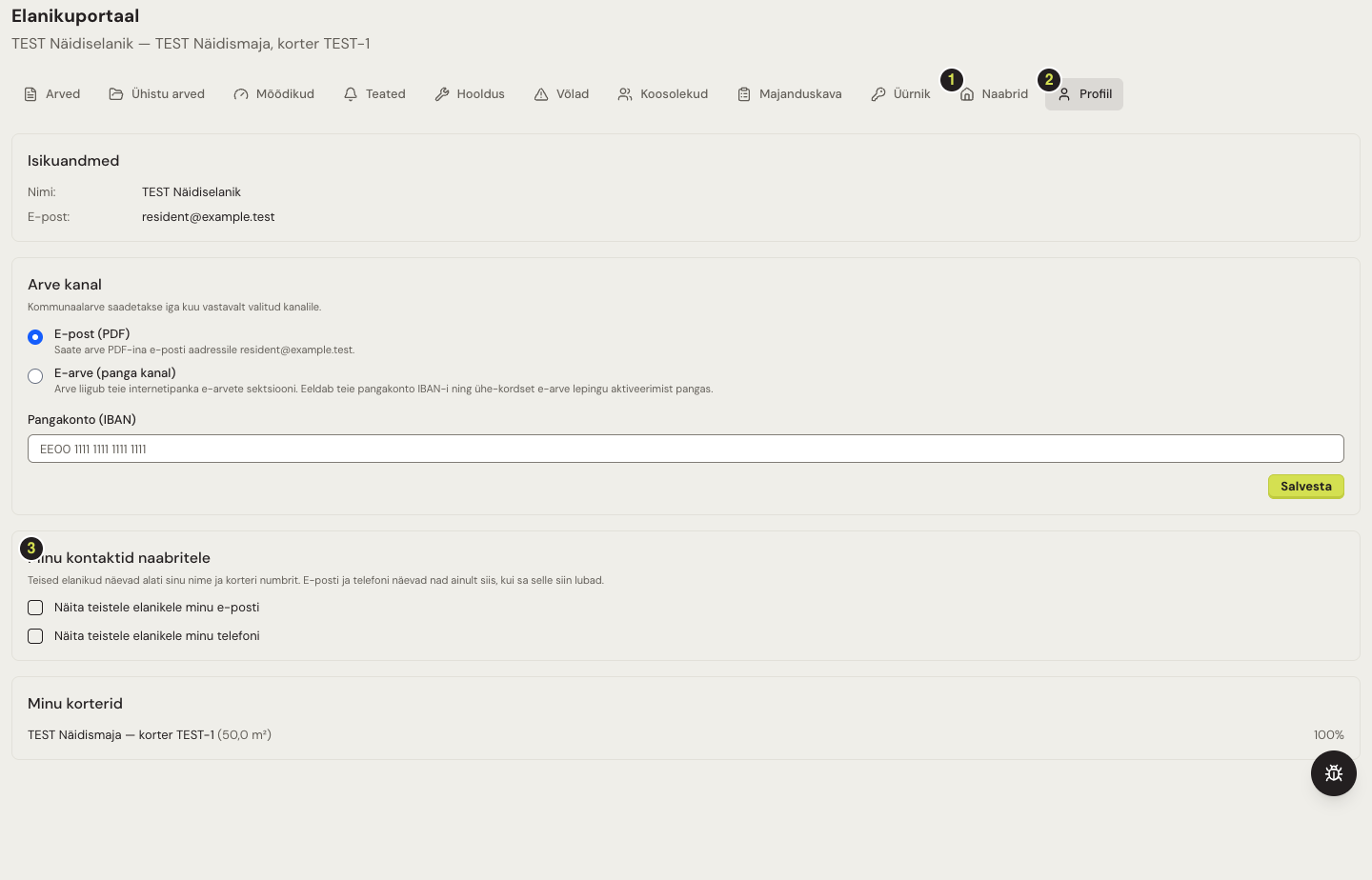
Residents receive an invitation by e-mail and, once signed in, see only their own apartment's data. The portal and the mobile app show invoices with PDFs, the association's general bills that the board has chosen to show, meters with 12 months of consumption, announcements, maintenance, debts, meetings, the economic plan and a list of neighbours. Neighbours see each other's name and apartment number; e-mail and phone only if the resident allows it.
In their profile, residents choose whether the monthly invoice arrives by e-mail as a PDF or, if the association's plan includes e-invoices, as an e-invoice in their internet bank. In the app they can copy the association's IBAN and reference number and open the payment in their banking app, if one is installed. An owner can add a tenant, who sees the apartment's invoices and meters and submits readings and fault reports but cannot vote, because the vote comes from ownership.
How the housing module connects to accounting.
The housing module does not post ledger entries itself. Invoices created from a confirmed charge run are ordinary sales invoices in accounting, and each resident is a customer there. The entry is created with the invoice, payments are matched to invoices from the bank statement and an overpayment is carried to the next invoice by default. When money has to be paid back to a resident, “Refund” creates a draft payment order.
A purchase invoice can be linked to the association's building so the cost appears in the building's reports, and the board can mark it visible to residents. HOA Reports show debtors, consumption, balances, an expense report and overpayments, with CSV export. The balance sheet and income statement come from the same general ledger, so the association's data does not have to be moved to another program at year-end.
Estonian registers, laws and digital signatures.
The association is selected from the Business Register, and the board member's right is checked against register data.
Building and apartment data are offered from the Building Register, and the building and apartments carry their register codes.
The written vote follows the deadlines of § 21 of the Apartment Ownership and Apartment Associations Act (KrtS) and sends the voting record to owners.
The economic plan checks the reserve fund minimum under § 48 of the same Act.
Meeting minutes can be signed with an ID card, Smart-ID or Mobile-ID; the readiness of each signing method is checked before you start using it.
An owner's late fee does not exceed the statutory rate allowed under § 42 of the Act, and each day uses the rate in force on that day.
Example: October invoices for a 24-apartment building.
A small apartment building's association has 24 apartments. The maintenance fee is split by floor area, the repair fund by co-ownership share, cold water by meter and waste collection by number of residents. On the first day of November, residents of three apartments whose October water reading is missing get a reminder. Two of them submit the reading in the app; the owner of the third calls the board member.
The board member starts the October charge run. The draft shows one missing reading and one apartment whose water consumption is more than three times its earlier average. She enters the missing reading straight from the draft, double-checks the high reading, presses “Recalculate” and confirms the charge run. The invoices go out with one click: most by e-mail, a few to the portal only. The same month brought an invoice for repairing the stairwell door, which she splits by co-ownership share in a separate charge run. Two weeks later the bank payments are matched to the invoices and debt management sends the first reminder for unpaid ones.
Spreadsheet and e-mail compared with Saldofy.

See also related topics.
Explore other Saldofy topics that may fit your company's workflow.

Price and plan.
The Saldofy Housing plan (€25/month + VAT) includes full accounting and housing association management for up to 30 apartments. The fee for additional apartments in larger associations and the other plans are on the price list.
E-invoices to the resident's internet bank are available when the association's plan includes e-invoices. If sending an e-invoice fails, the invoice goes to the resident by e-mail.
More guides
Last updated
Frequently asked questions.
Yes. The Saldofy Housing plan includes housing association management for up to 30 apartments together with full accounting; additional apartments for a larger association are charged as shown on the price list. During setup Saldofy offers the building and apartment data from the Building Register, and residents can be added from a CSV file.
Residents enter the reading in the resident portal or the mobile app. By default the reading goes to the previous month as long as that month has not been invoiced, and a new entry for the same month corrects the earlier one. At the start of the month, residents whose apartment meter is missing last month's reading get a reminder.
Yes. A charge rule splits the cost by floor area, by co-ownership share, equally between apartments, by number of residents, by meter readings or as a fixed amount per apartment. Each rule can have its own split method, and a price change applies from the date you choose.
Yes. Invoices created from a confirmed charge run are sales invoices in accounting, with their entries. Payments are matched to invoices from the bank statement, and the balance sheet and income statement come from the same general ledger.
The unpaid invoice moves through the debt management stages from two reminders to a final notice and the collections queue. A late fee can be added automatically to the next invoice. The association can agree a payment plan of 2–60 instalments with the owner, which pauses reminders and late fees in the meantime.
Yes, if the owner adds them as a tenant in the portal. The tenant sees the apartment's invoices, debt, meters and announcements and submits readings and fault reports. They cannot vote, because the weight of a vote comes from ownership.
Owners can vote in the resident portal during the meeting's voting window. The board can also run a written vote without convening a meeting: the draft decision goes to owners by e-mail, and after the deadline a voting record is produced and sent to the owners.
Not directly. Once a month's charge run has been confirmed or its invoices have gone out, Saldofy refuses to change that month's reading. First cancel or take back that month's charge run, then correct the reading and run the month again.
See how your association's monthly billing would work in Saldofy.
In a demo we set up one building, add a few apartments and charge rules and walk through the charge run, invoices and resident portal together. Plan contents are on the price list.