A POS system where every sale reaches stock and the books by itself.
Saldofy POS is cloud-based till software for shops, cafes, pubs, fast food counters and markets in Estonia. It runs in a browser on a computer, an Android tablet or an iPad. Every receipt reduces stock at once, and the day's sales reach the books with VAT, without exports or retyping.
A POS system that is part of your accounting.
An ordinary till program records the sale, takes the payment and prints a receipt. At the end of the month someone still has to move the sales into accounting, check the stock and add up the VAT. Saldofy POS works in the same database as accounting and inventory: products, prices, customers and accounts are shared by the till and by invoices.
For every sales point and calendar day, Saldofy builds a daily till report. When it is confirmed, the report makes two entries: a sales entry with payments, revenue accounts and VAT, and a cost of goods entry. The day is confirmed by itself when the last till of the sales point closes, or overnight if a till was left open. The receipt remains the source document, so from every amount you can go back to the exact sale.
How a sale travels from the till to the books.

The cashier scans the item or picks it from the favourites buttons; the basket stays on the device even if the page is reloaded.

The card amount goes to the integrated terminal, and the payment the terminal confirms is linked to the same receipt.

The goods leave stock at the moment of sale, and the receipt line gets the right VAT rate and revenue account.

The daily till report gathers sales, payments and VAT, and the entry appears in the general ledger without an export.
POS system on a tablet, a computer or a phone.
The till is a web app: nothing is installed, and the same till opens on any device with a modern browser. All hardware features work in Chrome and Edge. On a tablet you can add the till to the home screen like an app.
Windows computer or Mac
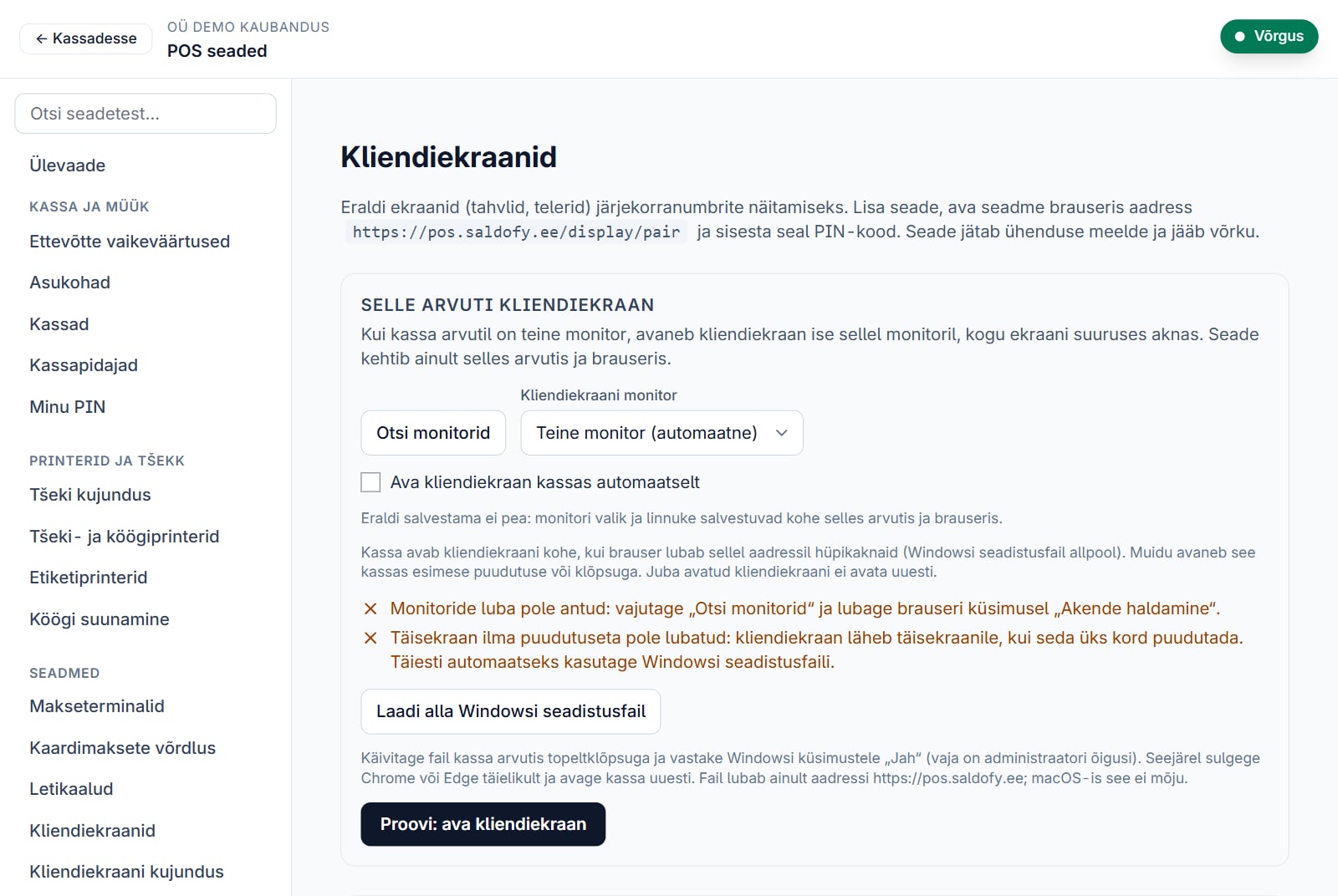
Suits a shop with a barcode scanner, USB receipt printer, cash drawer, counter scale and a customer display on a second monitor. On Windows a USB printer needs the WinUSB driver for the browser; a Mac needs no extra driver.
Android tablet
An Android tablet with Chrome is a compact till for a small sales point: the scanner, a USB receipt printer and offline selling work. A Bluetooth receipt printer connection is also available, but test your printer model before you rely on it. On Android a counter scale connects only through a cable with a PL2303 chip, so check the cable before you buy.
iPad and iPhone
Selling online, a barcode scanner, the customer display and e-receipts also work on an iPad. Browsers on Apple devices do not let a web page control a USB or Bluetooth printer or a scale, so a receipt printer and a scale cannot be connected to an iPad. We do not recommend an iPad for a till that must keep selling without internet.
Phone at a market
The Saldofy phone app has a mobile till for small sellers at a market who have no separate till device. The phone camera reads barcodes, a cash sale works out the change, and the receipt can be sent by email. Card payments are recorded by hand in the phone till.
A cloud POS that keeps selling without internet.
The till data lives in the Saldofy cloud. You manage products, prices, campaigns and cashiers from any computer, and the changes reach the tills by themselves. The basket is still kept on the till device, so scanning does not wait for the server, and the basket survives a page reload and a closed browser.
If the internet drops, selling continues on a device where the till's sales screen was opened online earlier in the same browser. Offline receipts are saved on the device and posted once when the connection returns. A card payment through an integrated terminal needs a connection; printing and other actions that need the server, such as adding a customer or a coupon and closing the shift, may need one too. In the sales point settings you decide whether offline sales are allowed and how large an offline receipt may be. Always use the same browser for the till and never sell in a private window.
Card terminal integration: Ingenico and SumUp Solo.
Integration means the till sends the receipt amount to the terminal by itself, and the payment the terminal confirms is linked to the same sale. The cashier does not type the amount a second time, and the card payment, the receipt and the accounting entry belong together.
Ingenico (PosXML)
A terminal with the PosXML payment application sits on the shop's local network and connects to Saldofy through an agent running on a computer at the sales point. The last four card digits and the authorisation code are saved from the response. If the response is lost on the way, the till asks the terminal for the result and does not charge the card twice. One terminal can serve several tills.
SumUp Solo
The terminal connects through SumUp's cloud API, and the reader is paired with the till by a code. For a void or a refund the till sends the card part back to the card through SumUp. In the settings you compare each day's card payments with those confirmed on your SumUp account and see payments that have no sale.
Other bank terminals
A terminal that is not integrated works next to the till: the cashier enters the amount on the terminal and records a card payment in the till. Verifone terminals are not integrated automatically at the moment, so ask before choosing a terminal whether the model and payment application fit.
A pending payment is not paid
If the terminal's answer is pending or unclear, the till does not mark the payment as successful. A payment confirmed later can be added to the sale or refunded to the customer; a payment set aside stays on the manager's list and in the X and Z reports.
POS system with inventory.
In Saldofy a POS system with inventory means the till and the warehouse use the same product catalogue and the same stock levels. A sale reduces stock at once, and the cost of goods is calculated with the product's costing method, FIFO or weighted average. Returned goods go back to the warehouse they were sold from.
Stock rule
The sales point setting “When the stock is not enough” decides what happens when an item that is out of stock is sold: the till warns, asks for confirmation or refuses the sale.
Price and stock in the till
The cashier sees an item's price and stock per warehouse, with reserved and free quantities, without leaving the till.
Ordering and receiving
The stock view shows sales speed, days of cover and a reorder suggestion. You can turn the suggestion into a purchase order and later receive the goods by barcode.
Stock counts and transfers
You start a partial stock count and scan it at the till, then confirm the difference on the web; goods can be moved from one warehouse to another.
Shelf labels
Shelf labels and price posters are printed on a thermal printer or on paper. The price comes from the same catalogue and campaign rules as in the till.
Packs and deposits
A case or pallet barcode sells the right number of units at once, and a deposit line is added automatically to an item that carries a deposit.
A separate till program and accounting compared with Saldofy.
When the till and accounting are separate programs, every day's sales go through an export, a summary entry and a check. In Saldofy the daily till report does that work.

Till sales workflow: a separate till program and accounting compared with Saldofy
Shifts, blind cash counts and the Z report.
A shift starts with the float left at the last close at the press of one button; for any other amount the till asks for a reason. Cash paid in and out is recorded in the shift. At closing the cashier counts the cash note by note without seeing the expected amount. If the difference is within the sales point's allowed limit, the first count is final; otherwise the cash is counted a second time.
The Z report shows payment methods, refunds, voided receipts, discounts and VAT by rate. You can print it on the receipt printer, open it as A4 or PDF and email it later as well. The expected cash of an open shift is visible only to a manager or to someone confirming with a manager PIN. Web analytics show whose counts most often do not match.
Tools cashiers use every day.
Refunds and exchanges
From the receipt history you can void or refund a whole receipt or only selected lines. An exchange opens a new sale with the same customer, and money can also be returned as store credit for the customer.
Age-restricted goods
For an age-restricted item the till asks for an ID check before adding the line and shows the cut-off date: the buyer must have been born on that day or earlier. Neither the date of birth nor the document number is stored.
Card tips
A tip can be added to a counter sale's card payment as a separate amount; a table bill's payment window has no tip yet. It is not turnover and is not subject to VAT; the daily entry takes it to the tips liability account, and analytics show tips per cashier.
Customer display
On a second monitor or in a separate window the customer sees the basket lines, discounts and the total, and your adverts while the basket is empty. After paying, the customer can get an e-receipt from the customer display by QR code.
Kitchen and queue numbers
Order lines are routed by product group to the kitchen display of the right station. The kitchen display colours orders by waiting time, and the cook marks a line as ready. A receipt can get a queue number, shown on a separate queue display.
Loyalty cards, gift cards and coupons
Customers join your loyalty programme through a link or a QR code, and the till finds them by phone number. In the till you can sell and top up gift cards, apply coupons and, if you wish, collect bonus points.
Campaigns and price rules
Happy hour by weekday and time, bundle prices, quantity prices and “buy X, get Y” are calculated by the till. Each line gets the price that is best for the customer, and discounts do not stack.
Working time from the till
When a cashier's user is linked to an employee, they record the start and end of their working day from the till menu. The entries reach Saldofy time tracking just like card reader taps.
POS system for cafes, pubs, bars and fast food.
In hospitality the till has to be fast at peak time and connected to the kitchen. The same Saldofy till covers a cafe, a bakery, a pub, a bar, a fast food counter and a restaurant: the difference is which features you switch on at the sales point. Each type of business has its own page with the workflow written out step by step.
Cafe and bakery
Favourites buttons by category put a pastry without a barcode on the receipt with one tap, and goods sold by weight come straight from the counter scale. In the weighing view you print a label for packed goods with weight, price and barcode, and on a supported printer also ingredients, allergens and a best-before date. More on the page “Café and bakery POS system”.
Pub and bar
A table's order stays open on the floor plan until the guests pay. For an age-restricted drink the till asks for an ID check, a timed price applies at chosen hours even past midnight, and card tips on counter sales do not count as turnover. More on the page “Bar and pub POS system”.
Fast food and pizza
A paid order gets a queue number, each kitchen station sees only its own lines on screen, and the queue display calls the finished order to the counter. A bundle price fits a combo meal. An extra topping is a separate product, because the till does not yet have modifier groups that change the price with one choice. More on the page “Fast food POS system for counters and pizzerias”.
Restaurant
The floor plan has zones and tables; a server opens a table's order and sends the lines to the kitchen. A bill can be split into several, or one table's orders merged into one bill, and a served line cannot be voided from the order. More on the page “Restaurant POS software”.
POS system for shops and events.
In a shop the scanner, stock levels and shelf labels matter most; at an event it is a temporary sales point and a shaky network. Both use the same till and the same accounting.
Shop
Barcode sales, pack barcodes, customer group prices, shelf labels and stock per warehouse. A business customer's open invoice can be paid at the till, and the basket can be turned into a quote or a sales order. More on the page “Retail POS software”.
Events and markets
For an event you create its own sales point and warehouse, move the goods there with a stock transfer and bring the remainder back afterwards. Offline selling works on a prepared laptop or Android tablet, and for a small stand the phone app has a mobile till. More on the page “Event POS system”.
Till sales in the Estonian VAT return.
The daily till report records sales by VAT rate, and in Saldofy receipts without an invoice go to the right lines of the Estonian VAT return (KMD, filed with the tax board EMTA) by themselves. Your accountant does not need to add up the Z reports for the KMD or import files from the till.
A void never changes a past day that has already been confirmed: the receipt stays a sale on its own day and goes into the day of the void as a negative amount. A refund is a negative receipt on the day of the refund. Receipts without an invoice do not go into the KMD INF annex. Card tips are not turnover and are not subject to VAT; they go to the tips liability account.
POS system for a new business.
Device: an existing laptop or an Android tablet with Chrome or Edge will do.
Products: add them by hand or load them into inventory from the Excel template.
Payments: cash, and an integrated SumUp Solo or Ingenico terminal or another terminal next to the till.
Receipts: an e-receipt by email; a receipt printer is optional and can be added later.
POS system price and monthly fee.
In Saldofy the till is the paid package Saldofy POS (€30/month + VAT). The package includes one till, offline sales, full accounting, inventory and AI features; each extra till adds a per-till fee, which you find on the price list. The till is also part of Saldofy All-in (€79/month + VAT), the package with every module, which includes two tills. With annual billing you pay for 10 months and get 12.
Total cost of a POS system: what the Saldofy POS package includes and what comes separately
Example: a small bakery cafe starts with one till.
A fictional bakery cafe opens its first sales point. The owner signs up, chooses “Point of sale” and works through the checklist on the first day of the trial: sales point, till and warehouse. Fifty products go into inventory from the Excel template. An Android tablet the owner already has, with Chrome and a USB receipt printer, becomes the till, and card payments are taken by a SumUp Solo paired with the till by a code. Buns and cakes are on the favourites buttons; packed coffee beans are sold by barcode.
After the first week the till's stock view shows that the coffee beans will run out in four days, and the reorder suggestion becomes a purchase order. Every evening ends with a blind cash count, and at the end of the month the accountant sees daily till reports rather than hundreds of single receipts; receipt sales are in the VAT return by rate. Before the trial ends the owner chooses the Saldofy POS package, and in summer adds a second till on the terrace, which adds the extra till fee. The business and the figures are fictional.
See also related topics.
Explore other Saldofy topics that may fit your company's workflow.

More guides
Last updated
Frequently asked questions.
A POS system is the software of a sales point together with its devices: it records the sale, takes the payment and issues a receipt. Saldofy POS is cloud-based and connected to inventory and accounting, so a sale reduces stock at once and the day's sales reach the general ledger with VAT and cost of goods.
Yes, the till opens in a browser on both an Android tablet and an iPad. On an Android tablet with Chrome the scanner, a USB receipt printer and offline selling work, and a counter scale connects through a cable with a PL2303 chip. On an iPad you can sell online, use a scanner and send e-receipts, but a receipt printer or a scale cannot be connected.
Yes, if the till's sales screen was opened online earlier on the same device and in the same browser. Then selling continues during the outage and receipts are synchronised when the connection returns. Card payments through an integrated terminal, closing the shift and other actions that need the server wait for the connection, so test your sales point's workflow before going live.
Ingenico terminals with the PosXML payment application and SumUp Solo are integrated. With them the till sends the amount to the terminal and links the confirmed payment to the sale. Other terminals can be used separately next to the till, with the card payment recorded in the till by hand.
The till is in the paid Saldofy POS package (€30/month + VAT), which includes one till, accounting and inventory. Each extra till costs extra, and with annual billing you pay for 10 months and get 12. Saldofy has no POS without a monthly fee, because the Free plan does not include the till, but you can try the till in a free trial before paying. Terms for the card terminal and card payments come from your payment provider.
Yes, the same till handles both counter sales and table orders. In a cafe or bakery you use favourites buttons and the counter scale, in a pub or bar open tabs, age checks and card tips on counter sales, and at a fast food counter queue numbers and the kitchen display. The till does not yet have modifier groups that change a product's price with one choice.
Yes. When you sign up, choose “Point of sale”: a free trial starts and a checklist walks you through creating the sales point and the first till. You can start with one till on a computer or tablet you already own, without a printer and with e-receipts, and add tills later. Because accounting and inventory are in the same package, you do not need to buy a separate till program and accounting program at the start.
The daily till report records sales by VAT rate, and receipts without an invoice go to the right lines of the KMD by themselves. A void goes into the day of the void as a negative amount, and a refund is a negative receipt on the day of the refund. Till receipts do not go into the KMD INF annex.
See how the POS system fits your sales point.
Tell us about your sales point, devices and card terminal. In a demo we show the path of a sale, a payment and the daily till report, and check together that your devices fit.