Time and attendance from shift schedule and card reader to payslip.
Saldofy time and attendance brings the shift schedule, arrivals and departures from a card reader and time marked in the employee portal into one place. Payroll reviews the exceptions, derives the monthly working-time sheet from approved shifts, including night, public holiday and overtime hours, and that same sheet goes into payroll.
Who time and attendance is for and what it solves.
Under the Estonian Employment Contracts Act (töölepingu seadus, TLS) an employer must keep a record of working time, and according to the Labour Inspectorate it must at least show the hours worked each day, sick days, holiday days and other days of absence. For office staff the monthly norm is often enough, but in shift work every hour turns into money. A shop opens on public holidays, a warehouse works at night, a bakery starts before six in the morning and a building site balances long summer days against shorter winter ones. In each case night hours, public holidays and overtime change the pay.
Often the schedule lives in an Excel sheet, arrivals and departures sit in an old access control system or on paper, and at month end someone adds up the hours by hand. Only then does it turn out that a departure is missing, a new card is not recognised and night hours have to be worked out from the clock times separately. In Saldofy the schedule, actual working time, working-time sheet and payroll are in the same program. Hours do not travel through files, and every unclear read is visible to payroll before the pay is approved.
From shift schedule to payslip in six steps.
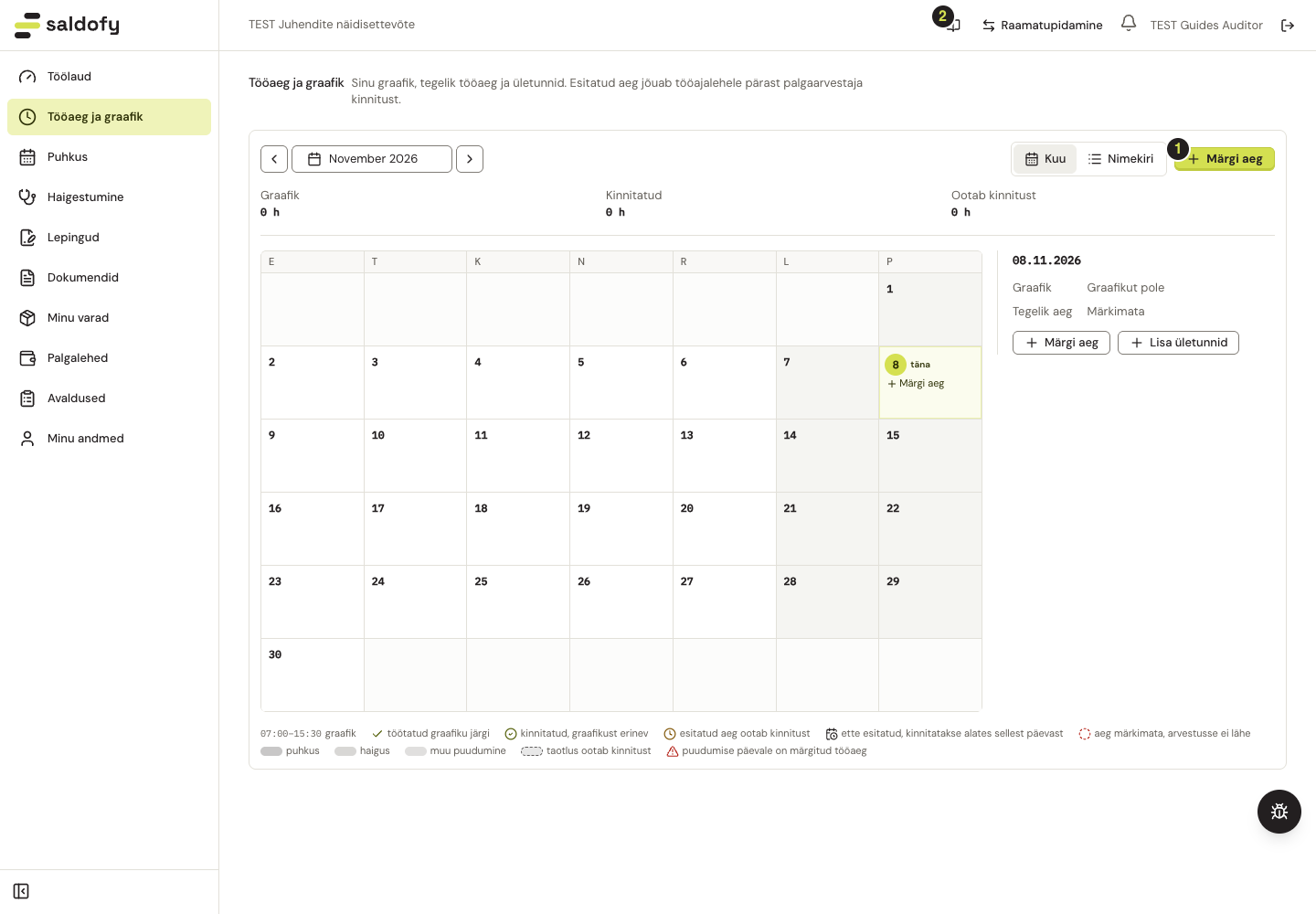
Open HR → Shift schedule and enter the month's schedule or import it from a CSV or XLSX file (employee, date, start, end and break). A shift that runs past midnight stays one shift.
On the card reader's Settings tab set the working-time rules: working days, start and end of the working day, norm hours, rounding, the long shift limit and the automatic closing time. Breaks, and whether they count as working time, are set in the company break schedule.
The employee records arrival and departure with a card, from the Working time menu at the till or on the Working time and schedule page of the employee portal. Card reads are paired into shifts and appear in the shift schedule as actual time.
On the Review tab and in the shift schedule you resolve the exceptions: a missing departure, an unknown card, an unusually long shift or a late arrival. Time submitted by an employee is approved or rejected with a reason.
At month end click Derive working-time sheet in the shift schedule. Approved shifts become the month's hours, overtime and night, public holiday and rest day hours on the working-time sheet. If you wish, Lock working-time sheet fixes them before payroll.
In payroll choose Calculate a new period, check the preview and click Approve payroll. Payslips and the payroll journal entry are created, and the pay is declared in the TSD for the month in which it is paid out.
What time and attendance includes.
Shift schedule and actual time
The monthly view shows each employee's planned schedule next to the time actually worked. A department quick filter and an employee filter keep a large schedule readable, and the schedule can be exported as a PDF or XLSX file. Confirm as scheduled turns past scheduled days into approved actual time for employees who worked as planned. Before you confirm, you see which days are skipped because of an absence or an overlap.
Card reader
The Saldofy card reader module connects the reader at the door directly to Saldofy. A reader with Wiegand 26 or Wiegand 34 output is suitable. With one reader, arrival and departure alternate; with two readers, one is for arrival and the other for departure. Each read is first stored in the device's memory and sent to Saldofy whenever a connection is available.
Working-time rules and breaks
Rounding only works in the employee's favour: if an arrival falls within the set number of minutes after the start of the working day, the shift starts at the start of the working day, and if a departure falls within the set minutes before its end, the shift ends at the end of the working day. Otherwise the actual minute counts. The actual time of the read is always kept. In the company break schedule you can define up to 16 breaks and choose whether each one counts as working time.
Night work and public holidays
Night hours (22:00–06:00) and public holiday hours are derived from the shift times, also when a shift runs past midnight or falls on the night the clocks change. For a shift that runs into a public holiday the company chooses whether holiday hours are only the part that falls on the holiday or the whole shift. Breaks stored on a shift do not change when company settings are changed later.
Overtime and summarised working time
Overtime is a separate shift type in the shift schedule and goes onto the working-time sheet as overtime in the month it was worked. For summarised working time you set the length of the accounting period in months and its first month on the employee card. Work above the norm is settled in the last month of the period; the sheets for the months in between show no such overtime.
Employee portal
On a phone or computer the employee sees their schedule and actual time, marks working time, adds overtime or confirms several days as scheduled at once. Submitted time reaches the working-time sheet only after payroll approves it, and an unmarked day is not included in the pay. The employee can also see their own card reads in the portal.
Reports and presence
The Work days tab shows each employee's first and last read of the day, the shifts and the paid hours, with export to PDF and XLSX. The schedule report shows one employee's month day by day with notes such as Late 20 min or Night work 1:00, and the PDF has signature fields for the employee and the approver. The Present now view shows who is in, based on the reads.
Permissions
The Working time permission module lets an assistant or shift manager build the schedule, fix reads and approve the working-time sheet without seeing payroll, payslips or bank payments. A user with payroll permission always has working-time permission as well.
Exceptions that need a person's decision before payroll.
The card reader does not guess. If a read cannot be turned into a shift unambiguously, it stays in review with a status and a reason and adds no working time until a user with working-time permission has decided.
The employee forgot to read their card when leaving. With automatic closing, Saldofy ends the shift at the end of the working day and marks it as closed automatically; otherwise the arrival stays as Departure not recorded.
An Unknown card is a new or replacement card that has not yet been given to an employee. On the Cards tab you give it to the employee, and the option Count this card's earlier reads as the employee's working time brings the earlier reads into account too.
If the gap between arrival and departure exceeds the long shift limit (12 hours by default), the shift waits for approval or correction in the shift schedule.
If the direction of reads does not fit, for example a departure without an arrival or a second arrival on the same day, the read gets the status Needs fixing.
If the card was left at home, Add read or Add a full workday saves the read with a mandatory reason. In the list it is marked By hand and the addition stays in the audit log.
A repeat in the same direction within a minute is a double read. It does not create a new shift, and the list shows how many seconds after the previous read it came.
How time and attendance connects with payroll, the till and production.
Time and attendance is part of Saldofy payroll. Derive working-time sheet writes hours along the same path as manual entry, so a month derived from shifts gives exactly the same payslip, to the cent, as hours typed in by hand. A final payslip for an employee paid by the hour or by the piece needs actual hours or units; it cannot be approved on a forecast. Approving payroll locks the working-time sheet and that month's shifts and posts the payroll entry to the general ledger.
Holidays and sick leave come from the register of work interruptions and are visible in the shift schedule cell; a user with permission can add an absence straight from the cell. In the POS system a cashier whose user account is linked to an employee records the start and end of the working day from the Working time menu, and those marks go into the same working-time record. Production operation time is separate: presence recorded at the door is not automatically time on a work order, because production links time to a specific operation.
Estonian working-time rules the record has to follow.
Under the Employment Contracts Act full-time work is 40 hours in a seven-day period and the working day is presumed to be 8 hours. Work at night (22:00–06:00) is paid at 1.25 times the wage unless it has been agreed that the wage already includes pay for night work, and work on a public holiday is paid at twice the wage. Overtime is compensated with time off unless monetary compensation has been agreed; in money it is paid at 1.5 times the wage. The working day before New Year's Day, Independence Day (24 February), Victory Day (23 June) and Christmas Eve is shortened by three hours. Under summarised working time, hours are counted at the end of the accounting period, which according to the Labour Inspectorate may be up to 4 months.
Saldofy applies these rules in the monthly norm and the supplements: the hourly rate of a monthly salary is derived from the month's working-time fund, with the shortened days taken into account, and night, public holiday and overtime hours receive a supplement on the basis of monetary compensation. If the employment contract provides for overtime to be compensated with time off, or for night pay to be included in the wage, review the extra hours on the working-time sheet before approval. The shift schedule warns when a working day of more than 6 hours has no break of at least 30 minutes, when daily rest falls below 11 hours or when a minor's working time exceeds their limits. A warning does not block saving, and Saldofy does not check every limit automatically, for example the average of 48 hours per seven-day period.
Price and hardware.
The shift schedule, working-time sheet and card reader software are part of Saldofy payroll. The Free plan includes payroll for a small number of employees; the exact limit and what each plan includes are on the pricing page.
The reader, the cards, the Saldofy card reader module and installation are chosen separately to match your doors, card type and network. The module can connect over Wi-Fi or Ethernet, and in the PoE version a single cable brings both network and power. Before buying devices, send us the reader and card model so we can check compatibility.
Example: a two-shift warehouse at the end of December.
A sample company's warehouse has 14 people in two shifts, and the night shift is scheduled from 22:00 to 06:30. There are two readers at the door, one for arrival and one for departure. Because the night shift is in the schedule, the evening arrival and the morning departure pair as usual. At the end of December payroll goes through the card reader's Review tab and the flags in the shift schedule and finds three cases. A day shift employee forgot to read their card when leaving and Saldofy closed the shift at the end of the working day; the shift manager confirms that the employee left as scheduled and payroll approves the shift. A new employee has used a card for a week that had not yet been assigned to them in Saldofy: payroll gives them the card and counts the earlier reads as working time. The third shift went over the 12-hour limit because the employee stayed late for a stocktake; payroll checks the time and approves it.
Once the exceptions are resolved, payroll clicks Derive working-time sheet. The night hours of the night shifts are shown separately on the sheet, warehouse staff who worked over the Christmas holidays have public holiday hours, and for two employees with a summarised accounting period running from October to December the overtime is settled now, in the last month of the period. The payroll preview no longer shows unresolved reads and payroll approves the period. The pay goes out at the beginning of January, so it is declared in the January TSD.
Spreadsheet and paper timesheet compared with Saldofy.

Working-time records: spreadsheet and paper compared with Saldofy
See also related topics.
Explore other Saldofy topics that may fit your company's workflow.

More guides
Last updated
Sources and further reading
Frequently asked questions.
The Saldofy card reader module accepts a reader with Wiegand 26 or Wiegand 34 output, and the card has to suit the same reader. An NFC label alone does not guarantee compatibility, because what matters is the card type and which number the reader outputs. Cards from an old access control system can be imported on the Cards tab. Send us the reader and card model before you buy, so we can check that they fit.
Only a fingerprint reader that identifies the employee on the device itself and outputs a Wiegand 26 or Wiegand 34 identifier. Saldofy receives only the identifier and the time from the reader; no fingerprint is sent to Saldofy. Support for every biometric reader is not promised, so we check the specific model before it is put to use.
Yes. The schedule can be entered or imported from a file, and Confirm as scheduled turns past scheduled days into actual time. Employees can submit their working time and overtime in the employee portal, and a cashier can record the start and end of the working day at the till. The card reader is one option, not a requirement.
Saldofy derives night hours (22:00–06:00) and public holiday hours from the shift times, also for shifts that run past midnight. An unpaid break is split proportionally between the parts of the shift. Payroll pays 1.25 times the wage in total for night hours and twice the wage for public holiday hours, and the hours are visible on the working-time sheet before approval.
On the employee card you set the length of the accounting period in months and its first month. While the period runs, no hours above the norm appear on the working-time sheet; they are settled in the last month of the period. Work marked in the shift schedule with the Overtime shift type goes onto the sheet as overtime in the month it was done.
If the working-time rules include automatic closing, Saldofy ends the open shift at the end of the working day and marks it as closed automatically; otherwise the arrival stays as Departure not recorded. If the card was left at home, a user with permission adds the read by hand with a mandatory reason. A read added by hand is marked By hand in the list, with who added it and why.
Not before it is checked. Reads become shifts in the shift schedule, at month end you derive the working-time sheet from them, and payroll uses the hours on that sheet. If the period still has unresolved reads or unapproved shifts, the payroll approval dialog shows how many, and you have to confirm the warning knowingly before approving.
No. Arrival and departure read at the door show presence and the length of the shift. Production operation time is recorded separately in the manufacturing module, so that the cost goes to the right work order.
See how working time would reach payroll in your company.
In the demo we go through one month: schedule, card reads, review of exceptions, working-time sheet and payroll. If you already have readers or cards, bring their model along.