Automation and integrations: what Saldofy connects to and what is ready today.
Saldofy integrations connect your accounts with banks, the Estonian Tax and Customs Board (EMTA), the e-invoice operator, card terminals, your online shop and your own systems. This page lists each integration with what flows through it, what your company needs to provide and whether it works in full today or is still in development.
Why integrations matter most in a small company.
In a small Estonian company, one person often handles the bank, the invoices and the tax returns, and the same round repeats every week. They download a statement from the internet bank and import it, prepare the VAT return and upload the file to e-MTA, retype a supplier's PDF invoice, key the card amount into the terminal a second time at the till and fix the online shop's stock when an item sold in the shop. Every time a figure is copied by hand, it can change.
Saldofy integrations remove that copying wherever the other side offers an official machine interface: the bank, EMTA, the e-invoice operator, the terminal provider and the online shop. Where there is no direct connection yet, the same flow works with a file and the matching rules and checks stay the same. An integration brings the data in, but you still decide when a return is filed, a payment is approved or a purchase invoice is posted.
How to switch the connections on.
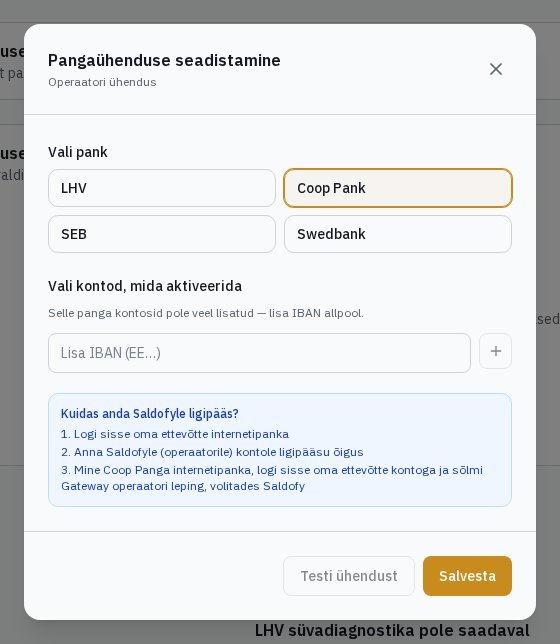
Bank: open Bank connections, click “Add bank connection”, choose the bank and add the account's IBAN. For LHV, start the contract from the same window: LHV sends the Connect contract to the company's representative and the connection starts working once the bank has activated it. For Coop Pank, you sign a Gateway operator agreement in your internet bank that authorises Saldofy.
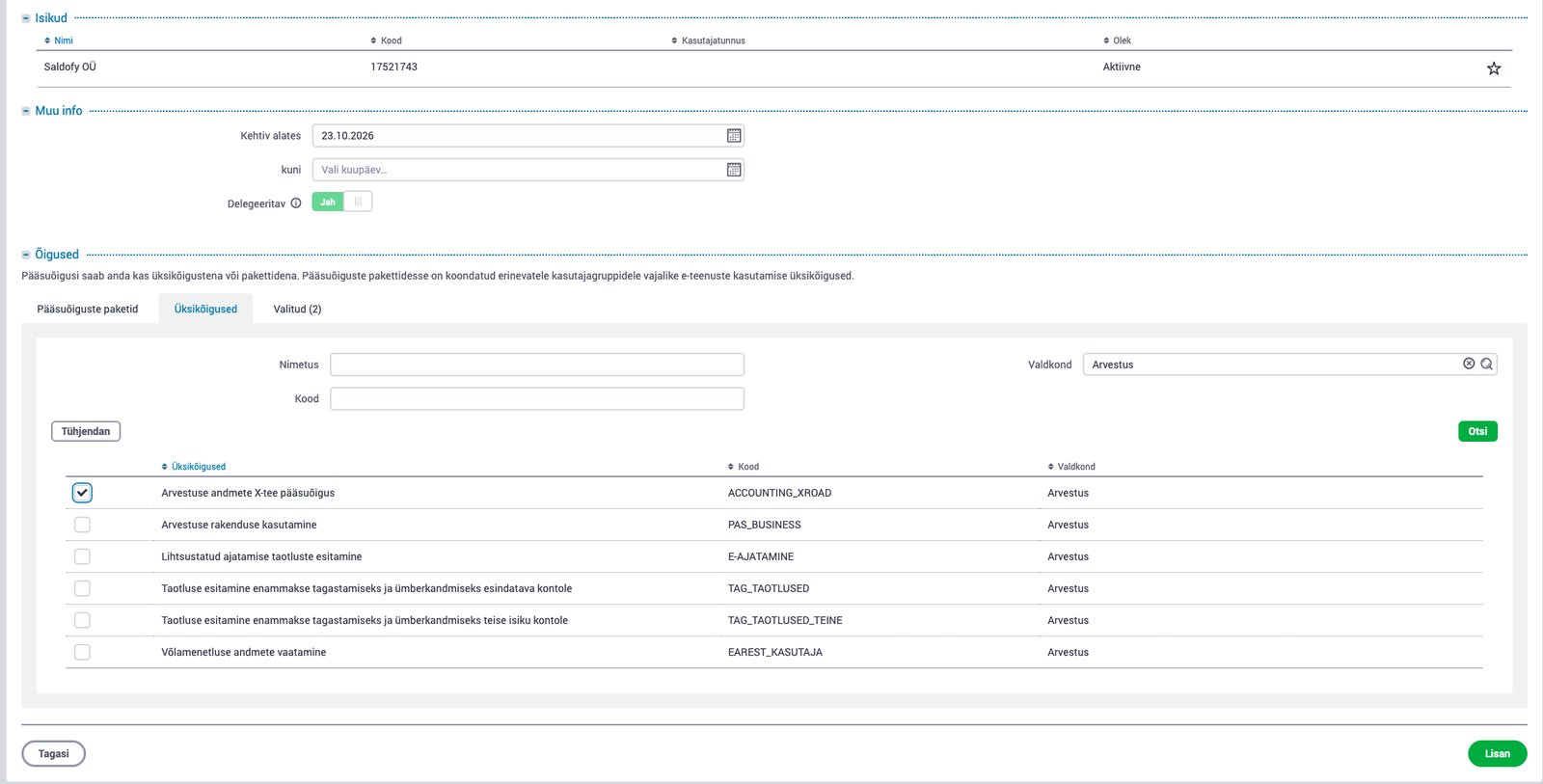
EMTA: a company representative grants Saldofy's X-tee security server owner an access right in e-MTA with the package “Masin-masin liidese volituse pakett (KMD, TÖR, TSD)”, code XT_MM. You then click “Confirm delegation” on the EMTA / X-Road settings tab.
E-invoices: switch on the Telema e-invoice service under Settings → Additional services. Saldofy first checks the business register to see whether the company already receives e-invoices through another operator and does not cut off that reception.
Card terminal: a SumUp Solo reader is paired with the till using a code. An Ingenico PosXML terminal sits on the shop's local network and connects through an agent running on the point of sale computer.
Online shop and your own systems: the WooCommerce connection and API keys are in the settings under Integrations, on the “WooCommerce” and “API access” tabs.
Test each connection with one real document: one statement line, one e-invoice, one card payment. That way you see where the data lands before you rely on it every day.
What each integration does.
Banks
Through LHV Connect and Coop Pank, statements and the account balance arrive by themselves, and purchase invoices and salaries can be paid directly without a payment file. For LHV you can switch on real-time notifications so new lines do not wait for the next query. Direct connections to Swedbank and SEB are in development: for now you import their statements, and Luminor's, as camt.053, MT940 or CSV files, and the same goes for Wise, Revolut and Paysera statements.
EMTA via X-tee
The VAT return (KMD) with its annex KMD INF is filed from Saldofy via X-tee, and EMTA's response, including the reason for a rejection, appears on the KMD page. From payouts made in October 2026 onwards, Saldofy sends TSD payouts line by line. The tax balances page shows the ledger's tax liabilities next to EMTA's balance of claims and prepayment account, and payroll can import active employments from the employment register.
E-invoices through Telema
A sales invoice goes out through Telema as an e-invoice to recipients registered for e-invoices, and as a PDF to everyone else. Suppliers' e-invoices arrive on the “Incoming bills” page. The status of each delivery and the operator's reason for any rejection are shown with the invoice.
Telema EDI orders
When a retail chain orders by EDI, the buyer's order arrives in Saldofy as a draft sales order, and the order response and despatch advice go back through Telema. You can send a purchase order to a supplier the same way. This needs the company's own Telema EDI channel and is switched on separately from e-invoices.
Card terminals
The till sends the receipt amount straight to a SumUp Solo or Ingenico PosXML terminal, and the confirmed payment is linked to the same sale, so the cashier never keys the amount twice. If the terminal's answer is still pending, the till does not mark the payment as successful. Other terminals can be used next to the till without an integration.
WooCommerce online shop
Saldofy adds to the shop the products ticked “In the e-shop” on the product card and keeps their stock up to date every 5 or 15 minutes or every hour. Price and name are updated only if that is switched on in the settings. The connection is one way: shop orders are not brought into Saldofy.
Public API and webhooks
With an API key, your own system can work with invoices, purchase invoices, customers, products, stock levels and the general ledger within the user's permissions. The partner REST API offers draft invoices, document upload to the purchase invoice inbox, products, stock and till receipts. Webhooks report events such as an invoice being created, posted or paid. Filing returns, initiating payments and approvals are available in the web app only.
Migration from other software
From Merit Aktiva and SmartAccounts, the migration uses an API key to bring over the chart of accounts, master data, opening balances and open invoices from the start date you choose, and you see a preview before anything is imported. For SimplBooks, you upload the chart of accounts, the day journal and the turnover report next to the API connection. There is no direct connection to the RIK e-arveldaja.
Business register and payment link
When you add a customer or supplier, the details come from the Estonian business register, the Finnish register or VIES. With an LHV Paytech merchant agreement, a customer can pay an invoice from its payment link by bank link, card, Apple Pay or Google Pay, and the payment is linked to the invoice.
Integration status today.
What flows through each integration and its status in November 2026.
Automation that needs no outside connection.
Part of the automation runs inside Saldofy and depends on no contract. Recurring invoices are created every week, month, quarter or year, and with automatic sending they go to the customer by themselves. Booking rules mark bank lines without a document, such as a bank fee or a loan payment, on every import, and they reach the general ledger after a preview. Payment reminders, depreciation and European Central Bank exchange rates run on a schedule.
Supplier invoices reach the “Incoming bills” page from the company mailbox through e-mail import, with the details already read by AI. A fuller picture of what the software does by itself and where a person decides is on the automated accounting page.
What your company needs to provide.
Saldofy is the technical side of each integration, but behind every connection is the company's own contract or authorisation. A bank connection needs an LHV Connect contract or a Coop Pank Gateway operator agreement. EMTA needs an access right in e-MTA, and the person filing returns needs a personal code confirmed with an ID card, Smart-ID or Mobile-ID. A card terminal needs a contract with the payment service provider, and Telema EDI needs the company's own EDI channel.
If a bank or payment service provider charges a fee, it comes from their price list, not from your Saldofy plan. Each bank account is a separate connection in Saldofy that can be switched off or deleted on its own.
Example: a hardware store with two banks and an online shop.
A small hardware store sells in its shop and through a WooCommerce online shop. Its current account is with LHV, its loan account with Swedbank, and its building contractor customers want e-invoices. By the morning, the LHV lines are in Saldofy and payments with a reference number are linked to their invoices. Once a month the accountant imports the Swedbank loan account statement as a camt.053 file, and the loan payment goes to the general ledger through a booking rule after a preview.
At the till, a customer pays with the SumUp Solo terminal: the amount goes to the terminal by itself and the confirmation stays with the receipt. When the last box of wall plugs is sold in the shop, the online shop's stock changes with the next sync. Invoices to building contractors go out as e-invoices through Telema, and suppliers' e-invoices arrive among the incoming bills. At month-end the accountant files the VAT return via X-tee and sees EMTA's response on the KMD page.
Integrations and plans.
The bank integration and e-invoices are included even in the Saldofy Free plan. The public API, and with it the WooCommerce connection, is part of the plans that include API access: Growth, Bureau, POS and All-in. API keys cannot be created on the Free, Solo or Housing plans. Card terminal integration is part of the POS system. All plans and their limits are on the pricing page.
See also related topics.
Explore other Saldofy topics that may fit your company's workflow.

More guides
Last updated
Frequently asked questions.
LHV Connect and Coop Pank work in full: statements and the balance arrive by themselves and purchase invoices and salaries can be paid through them. Direct connections to Swedbank and SEB are in development. Until then, and for other banks, you import the statement as a camt.053, MT940 or CSV file and the matching rules work the same way.
Yes, once a company representative has given Saldofy an X-tee authorisation in e-MTA with the XT_MM package and “Confirm delegation” has been clicked in the settings. The KMD with KMD INF and the TSD payouts go via X-tee and EMTA's response comes back to Saldofy. Without the authorisation, Saldofy prepares the files and you upload them to e-MTA.
No. The operator Telema is already connected in Saldofy, and you switch the service on under Settings → Additional services. E-invoices go to Telema in the eDoc format with the invoice PDF inside. If the company already receives e-invoices through another operator, Saldofy tells you first and does not switch reception on.
SumUp Solo and terminals running the Ingenico PosXML payment application are integrated. With them, the till sends the amount to the terminal and links the confirmed payment to the sale. Other terminals can be used next to the till by marking the card payment manually.
No. The WooCommerce connection is one way: Saldofy sends products and stock to the shop and, depending on the settings, price and name too. Shop orders are not brought into Saldofy. The connection is available in plans that include the API.
With an API key, your system can read and create invoices, purchase invoices, customers and products and read stock levels within the permissions of the user and the key. You can set an expiry date and allowed IP addresses for each key. Filing returns, initiating payments and approvals are available in the web app only. The developer documentation is at saldofy.ee/developers.
Yes. The migration uses an API key to bring over the chart of accounts, master data, opening balances and open invoices from the start date you choose, and you see a preview before importing. If you keep using Merit during the transition, Saldofy fetches sales and purchase invoices from it twice a day. There is no direct connection to the RIK e-arveldaja.
No. An integration brings the data in and prepares the documents, but a person decides on filing the KMD and TSD, approving payments and posting purchase invoices. Saldofy's general rule is that the first click never sends or posts anything: it shows you first what will happen.
See how your bank, EMTA and e-invoices connect to Saldofy.
In a demo we go through your company's integrations: what works straight away, what you need from your bank or e-MTA and what you handle by file for now. Plan contents are on the pricing page.