Accounting software where entries come from invoices and the bank.
Saldofy is web-based accounting software for companies in Estonia: sales and purchase invoices, the bank, payroll, VAT and reports share one set of data, and each entry is made from a document, not typed by hand. Start on the Free plan, which does not expire, or bring your data over from your previous accounting program.
What accounting software does for you.
Accounting software is not just a place to write numbers down. Good accounting software takes over the repetitive work: a sales invoice becomes an entry, a bank line becomes a payment received, a payslip becomes a tax liability and the entries become a balance sheet. Your job is to check the exceptions, not to type the same amount three times.
Saldofy is built around Estonian rules. The chart of accounts, VAT types, the VAT return (KMD) with its KMD INF annex, the payroll tax return (TSD), reference numbers and e-invoices work the way an Estonian company needs them every day. The interface is in Estonian and is also available in English and Russian.
Saldofy compared with an invoicing tool and Excel.
Many companies start with an invoicing tool and a spreadsheet: invoices are made in one place, expense documents go into a folder, and at month end everything is pulled together. That works while there are only a few invoices. The comparison shows where the manual work starts to grow.

Monthly accounting work: an invoicing tool and Excel compared with Saldofy
Who Saldofy accounting software is for.
A newly founded private limited company (OÜ)
You issue invoices yourself and want the VAT return and the annual report to hold no surprises. The Free plan covers the accounting of one company with a small volume of invoices.
A growing small business
Employees, VAT registration and more purchase invoices come along. Payroll, TSD and the bank connection are in the same system, so you do not need separate programs.
A company switching programs
From Merit Aktiva, the migration brings over master data, opening balances and open invoices by itself. From other programs, data comes through an API connection or as files.
Accountants and accounting firms
You work in several client companies with one user. Each company's data is kept separate, and roles decide who sees and approves what.
Trade and manufacturing
Inventory, the POS system and manufacturing post to the same general ledger. POS and manufacturing are separate modules that you add when you need them.
One month in Saldofy: a typical routine.
An example of a small service company with two employees that is registered for VAT.
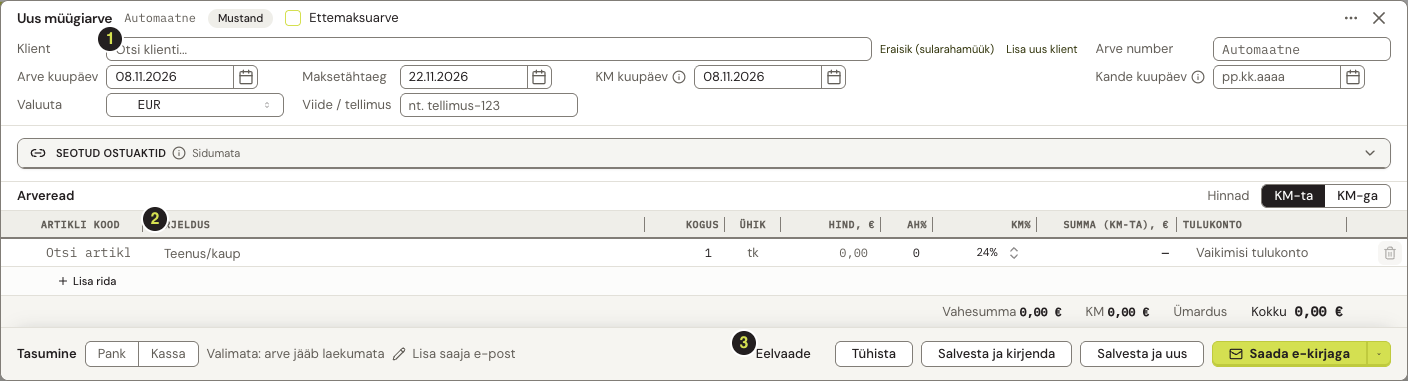
You create a sales invoice and send it by e-mail or as an e-invoice. Confirming it creates the entry and puts the VAT in the right period.
A purchase invoice arrives in the inbox as an e-invoice, or you upload a PDF or photo, also from the mobile app. AI fills in the lines, you check the account and confirm.
The bank statement comes straight from LHV or Coop Pank, and from other banks as a file. Saldofy matches payments with a reference number and amount to invoices, and you confirm the match.
You calculate salaries, make the payments and get the TSD data from the same payroll sheet without entering it again.
You check unpaid invoices and account balances, then lock the month so that its entries cannot be changed afterwards.
By the 20th of the following month you file the KMD together with KMD INF over X-tee and see the Tax and Customs Board's (EMTA) response in Saldofy.
The balance sheet, income statement and receivables and payables reports are there for management right away, with no separate summary spreadsheet.
Moving from your previous program: what you can bring yourself.
Saldofy's migration first pulls your data into a preview and checks that the debits and credits of the opening balances are equal and that open invoices agree with the receivables and payables accounts. Nothing is written into your books until you confirm the import.
Merit Aktiva
With an API key, Saldofy brings over the chart of accounts, customers, suppliers, items, bank accounts, opening balances, open invoices, opening stock and the fixed asset register. If you wish, it also brings earlier invoices with their PDFs as an archive and the history of monthly turnovers. Sales invoice numbering continues from where it left off.
Merit Palk
A separate payroll migration: pay types and the employee list come from Excel files, while contracts, base salaries, holiday balances and pay history come through the API. This way average pay can be calculated from the very first month.
SmartAccounts
An API connection brings the chart of accounts, opening balances, customers, suppliers, items, bank accounts, open invoices and stock quantities as at the moment of the pull. The SmartAccounts interface does not export the fixed asset register, so you add it in Saldofy.
SimplBooks
An API connection, still in beta, brings customers, suppliers, items, bank accounts and documents. Alongside it you upload the SimplBooks chart of accounts, day journal and trial balance files, from which the historical general ledger is built. The import compares the result with the control reports.
RIK e-arveldaja and other programs
There is no direct connection. You export the trial balance, customers, suppliers, items and unpaid invoices as files, and Saldofy support helps you bring them over.
Switching over step by step.
The same order applies whether you use the migration or move over with files.
Choose the start date. It is always the first day of a month, preferably the start of the previous month.
Finish and check the period before the start date in your old program, because the opening balance is taken from exactly that state.
Bring over the chart of accounts, customers, suppliers and items. In the Excel import you see the column mapping and a preview before confirming.
Enter or import the opening balances as at the day before the start date. Debits and credits must balance.
Bring over unpaid sales and purchase invoices, so that payments after the start date can be matched against them.
File the KMD and TSD for the months before the start date from your old program. Saldofy files returns from the start month onwards.
Compare the balance on the first bank statement and check that the receivables and payables accounts agree with the open invoices.
Pricing in brief: start on the Free plan that does not expire.
Saldofy Free is a permanent plan, not a trial that ends one day. With it you keep the books of one company: sales and purchase invoices, the general ledger, reports and the VAT return. What is limited is volume, for example the number of invoices per month, the number of employees in payroll and the number of companies per account. The exact limits and the prices of the paid plans are on the price list.
When volume grows or you need to manage several companies, choose a paid plan. You can try paid plans before paying, and with annual billing you pay for 12 months the same as for 10. AI invoice recognition is included in the price. The POS system is a separate paid plan, and each additional till costs extra.
Bank connections and payments.
Saldofy has a direct connection with LHV and Coop Pank: statements and the account balance arrive by themselves, and you can send payment orders for suppliers straight to the bank. Statements from SEB, Swedbank, Luminor, Wise, Revolut and Paysera are imported as files (camt.053, MT940, CSV, or XLSX for Paysera).
Saldofy matches a payment with a reference number and the right amount to its sales invoice by itself, and it is posted when you confirm the match or, with automatic posting switched on in the settings, already on import; a line without a reference number you match to an invoice by hand. You can pay several purchase invoices at once. For a bank without a direct connection you get a payment file (pain.001) to upload to your internet bank.
Send and receive e-invoices in one place.
You can send a sales invoice as an e-invoice through the operator Telema, which forwards it to the recipient's operator. The e-invoice goes to Telema in the eDoc format with the invoice PDF inside. If the buyer has registered in the Business Register as an e-invoice recipient, they may ask to receive the invoice as an e-invoice.
An incoming e-invoice arrives in the purchase invoice inbox with its lines and VAT, and the supplier is found by registry code. If the recipient also uses Saldofy, the e-invoice goes straight into their purchase invoice inbox.
The VAT return and EMTA over X-tee.
The KMD and KMD INF are built from the lines of sales and purchase invoices, and before filing you can see which documents each amount comes from. Once you have given Saldofy a machine-to-machine interface authorisation in e-MTA, the Tax and Customs Board's e-service, you file the KMD straight from Saldofy over X-tee, Estonia's data exchange layer. EMTA's response, including the reason for a rejection, appears on the KMD page.
The same authorisation also covers filing the TSD. Without it you download the return as a file and submit it in e-MTA yourself. If you also grant the right to view accounting data in e-MTA, the Tax balances report compares the tax liabilities in the general ledger with the balance of EMTA's claims.
Annual report and XBRL.
At year end Saldofy prepares the balance sheet and income statement from the same entries you used all year. Where the report format requires them, a cash flow statement and a statement of changes in equity are added. You get the financial statements as PDF and Excel files, and the notes are exported separately.
In Saldofy the XBRL file is a working file for your archive and your auditor. You review the report, sign it and submit it in the e-Business Register company portal within six months after the end of the financial year.
Several companies and accountant access.
With one user you can work in the accounts of several companies and switch between them from the menu. Each company's data, chart of accounts and periods are kept separate from the others. Several companies under one account need the Solo, Growth, Bureau or All-in plan; the Free, POS and Housing plans allow one company per account.
You give your accountant, manager and employees a role that decides who can view, enter or approve. The number of users is not limited, so your accountant works in your company with their own user, not with your passwords.
See also related topics.
Explore other Saldofy topics that may fit your company's workflow.

More guides
Last updated
Frequently asked questions.
In practice, yes. An accounting program often means software installed on a computer, while accounting software today usually means a web service. Saldofy runs in the browser, with no installation or server needed, and you can photograph expense documents with the mobile app.
Saldofy Free is a permanent plan for the accounting of one company with a small volume of invoices. It includes sales and purchase invoices, the general ledger, reports and the VAT return. Paid plans cover larger volumes, several companies or extra modules. Prices and limits are on the price list.
Create an API key in Merit Aktiva (this needs the PRO or PREMIUM package, as the Standard package cannot create a key), choose a start date in Saldofy and run the migration. Saldofy pulls the data into a preview, checks the opening balances and open invoices and imports them only once you confirm. If you keep working in Merit for a while, Saldofy brings sales and purchase invoices over from it twice a day.
Saldofy connects to SmartAccounts and SimplBooks with an API key. From SmartAccounts, opening balances and open invoices come over too. The SimplBooks beta connection brings master data and documents, and together with the chart of accounts, day journal and trial balance files also the historical general ledger. There is no direct connection with RIK e-arveldaja: you export the data as files and Saldofy support helps you bring them over.
The start date is always the first day of a month. Saldofy suggests the start of the previous month: then you enter only the previous and current month's invoices again in Saldofy. If there are very many invoices, or the previous month's KMD has already been filed from the old program, choose the start of the current month.
A small company can handle invoices, bank lines and the KMD itself, because entries are made from documents. Unusual transactions and the judgements in the annual report are worth reviewing with an accountant. The accountant can work in your company with their own user and role.
Yes, once you have given Saldofy the machine-to-machine interface authorisation in e-MTA. The person filing must have their Estonian personal identification code linked to their Saldofy account, for example through ID card or Smart-ID. Without the authorisation you download the KMD file and submit it in e-MTA yourself.
Yes. Changing plans does not change your accounting: invoices, entries and reports stay in the same company. If the trial of a paid plan ends and you do not choose a plan, the company continues on the Free plan and all data is kept.
Try Saldofy with your own company's figures.
Create an account, choose a start date and issue your first invoice. If you are coming from another program, start with the migration.