Accounts payable: from approval and payment to the supplier balance.
Saldofy accounts payable picks up where invoice capture ends. The invoice goes through an approval workflow, gets its cost account and dimensions, is paid on payment day straight from the bank and is matched to the bank statement line. At month end you see, supplier by supplier, how much is due and when.
The invoice is entered, but the work is not done.
Once the purchase invoice data is in Saldofy, half of the work is still ahead. At a construction company the site manager has to approve a materials invoice, and the owner has to approve the larger ones too. The accountant needs to know which site or department the cost belongs to. On payment day someone has to check which invoices fall due and type the payments into the internet bank. After that, someone searches the bank statement to work out which invoice each payment was for.
These are exactly the points where mistakes cost real money: the same invoice is paid twice, a payment goes to a new account given in a fraudulent e-mail, a forgotten invoice collects late-payment interest or the supplier balance does not match at month end. Saldofy accounts payable keeps approvals, coding, payments and the supplier balance attached to the same document. Every invoice shows its status and who did what.
A purchase invoice in Saldofy, step by step.
One ordinary purchase invoice, from arrival to checking the supplier balance. How the data is read from the document is described on the purchase invoice capture page.
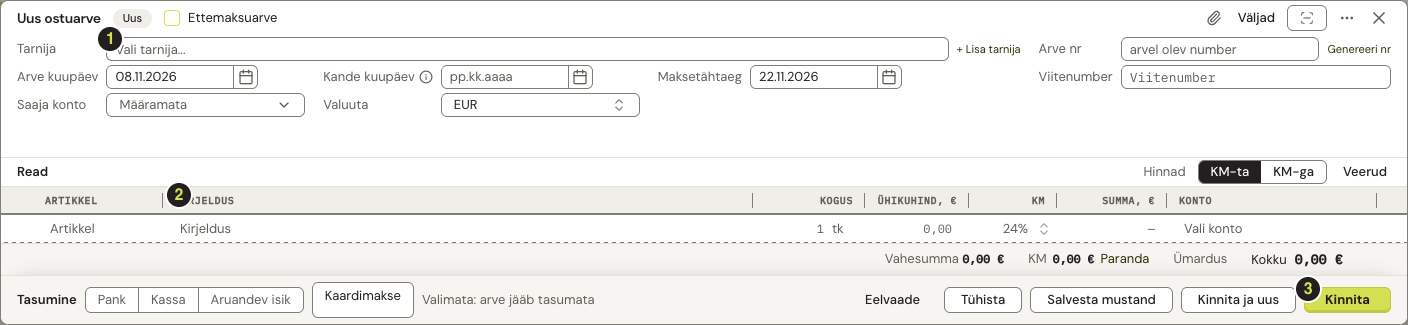
The invoice arrives under Purchases → Incoming bills through e-mail import, an upload, the mobile app or as an e-invoice. An invoice without a file is entered on the New purchase invoice form.
The approval workflow decides, based on your settings, who has to approve the invoice. Approvers get a notification and an e-mail and see their invoices on the For me to approve tab. Questions and answers stay in the invoice's conversation.
The accountant checks the supplier, dates, cost account, VAT and dimensions. Purchase invoice rules and the same supplier's earlier invoices suggest the coding.
When the required approvals are in place, the purchase invoice is confirmed. An entry is posted for the expense or inventory, input VAT and the amount owed to the supplier, and the invoice appears in the debt report with its due date.
On payment day you select the invoices to pay in the purchase invoice list and click Pay from the bank. With LHV and Coop Pank the payment order goes straight to the bank; for another bank Saldofy prepares a payment file.
With a direct connection the invoice is marked as paid when the bank confirms the payment was executed. With a payment file you mark the order as executed yourself. A payment made outside Saldofy is matched to the invoice through the bank statement line.
At month end the Debt to suppliers report shows whom you owe and how much, and you can send a supplier a balance statement.
What accounts payable in Saldofy includes.
Conditional approval workflows
Under Settings → Accounting → Purchase invoice approval workflows you set rules by supplier, total including VAT, currency and cost centre or project. Each matching rule adds stages, and each stage can require, for example, two approvals out of three people. For holidays an approver can be given a substitute with start and end dates. If the amount, supplier or dimensions change later, a new round starts and the earlier decisions stay in the history.
Cost accounts, VAT and dimensions
Purchase invoice rules set the account, VAT and cost centre by supplier, line description or amount. A dimension can apply to the whole invoice or to a single line. Besides project and cost centre you can create your own dimensions, such as site, vehicle or department, and make some of them mandatory. For a foreign supplier Saldofy suggests the VAT treatment based on the supplier's country, the VIES response and whether the line is goods or a service.
Posting date and periodization
A June services invoice dated 1 July can be given 30 June as its posting date, so the expense and input VAT land in June. If the invoice states a service period, Saldofy suggests the end of that period itself, and the decision stays with you. An annual insurance policy or licence can be spread over, say, 12 months from the line's Periodize menu, and the monthly entries are posted automatically.
Due dates and debt
The due date comes from the invoice or from the payment terms on the supplier card. The Overdue tab of the purchase invoice list holds late invoices, and the dashboard shows an AP overdue figure. The Debt to suppliers report lists unpaid invoices by due date with the days overdue, and Periodic debt groups the debt by age.
Several invoices in one payment
Select invoices in the list and click Pay from the bank. Saldofy suggests a payer account at the same bank as the supplier's account and creates one payment order per payer account. Each invoice shows whether its payment file is pending or the payment has been sent to the bank. An invoice with a payment order in progress cannot be paid a second time.
Supplier bank accounts and payment confirmation
In settings you can switch on approval of a supplier's new bank account. A payment then cannot go to the new account until the chosen approvers have accepted it, the person who added the account cannot approve it and a pending account expires after 30 days. Next to the pay button the payer sees risk signals, such as a first payment to that account. You can also require every payment to be confirmed with a password, Smart-ID, Mobiil-ID or an ID card.
Matching payments to the bank statement
When the reference number, or the invoice number in the payment description, and the amount match an invoice, the payment is matched to it automatically. A match on the supplier's IBAN and the amount produces a suggestion for the accountant to confirm. Saldofy does not treat a matching name and amount alone as evidence, because that often leads to the wrong invoice. Such a line is left for manual matching.
Credit notes and advance invoices
Create purchase credit note on an invoice opens a prefilled form where you can change lines and amounts. A credit note cannot exceed the part of the original invoice not yet credited, and it reduces the invoice's open balance, so the next payment takes it into account. Returned goods leave the warehouse with the credit note. Pro forma and advance invoices sit in their own Advance invoices list: the expense only arises from the final invoice, and until then the payment stays as a prepayment to the supplier.
Netting and balance statements
If a supplier is also your customer, you create an act under Banking → Netting that offsets their open sales and purchase invoices, prepayments and credit notes in one entry. The partner confirms the act through a link or with a signed file. From the Balance statements page you send a supplier a balance statement, digitally signed if you wish, and the supplier replies through a link.
How a purchase invoice connects to the other modules.
A purchase invoice is not an island in Saldofy. On a stock item line the invoice increases stock, and the amount goes to the inventory account instead of an expense account. The Fixed-asset purchase checkbox on a line creates a fixed asset record when the invoice is confirmed. A purchase invoice can be created from a purchase order, so the lines do not have to be entered again. An invoice paid from the cash desk is posted together with the cash payment.
If an employee paid the invoice with their own money, choose Accountable person as the payment: the payment goes into their expense report and is settled there against an advance or a reimbursement. An invoice already paid with the company card is marked as a card payment. It stays open until the card line arrives with the bank statement and is not offered for a payment order in the meantime. Every payment reaches the general ledger through the same invoice, not as a separately typed entry.
Estonian requirements: KMD, KMD INF, TSD and e-invoices.
Input VAT from a confirmed purchase invoice flows into the Estonian VAT return (KMD) and its annex KMD INF by posting date, so return lines are not collected by hand. On a reverse-charge purchase line Estonian VAT is calculated even though the VAT paid to the supplier is zero. Before filing you can see which documents each line comes from.
A purchase invoice line can be marked as a taxable expense for annex 4, 5 or 6 of the TSD (the Estonian income and social tax return), for example a fringe benefit or a gift. The line goes to the taxable expense register and from there into the TSD. A purchase invoice arriving as an e-invoice lands in the same incoming bills inbox and goes through the same approvals and duplicate checks as a PDF invoice.
How much accounts payable costs.
Accounts payable is part of Saldofy accounting, not a separately priced module. The Saldofy Free plan allows up to 15 purchase invoices a month. From Saldofy Solo (€15/month + VAT) upwards the number of purchase invoices is not limited. The bank connection and automatic invoice reading are included in the free plan too. The exact contents of each plan and the prices are on the price list.
Example: a builder where the site manager approves and the owner pays.
A small construction company is building three houses at once, and each house is a project in Saldofy. Materials suppliers send invoices to the company's invoice mailbox. The first approval rule routes each house's invoices to its site manager, and the second adds an owner stage for invoices above an agreed limit. In July one site manager is on holiday, and a substitute approves their invoices for two weeks.
An external accounting firm checks the coding and confirms the invoices. On Fridays the owner opens the purchase invoice list, selects the invoices due next week and pays them through LHV in one payment order. One day an e-mail says a supplier's bank account has changed. The accounting firm adds the new account to the supplier card, but no payment can go there until the owner has approved the account. The owner calls the supplier on the number already on file and learns the e-mail was fake. At year end the accounting firm sends balance statements to the larger suppliers. The company and situations are fictional.
Spreadsheet and internet bank or Saldofy.

How accounts payable work changes when approval, payment and debt sit on the same document.
See also related topics.
Explore other Saldofy topics that may fit your company's workflow.

More guides
Last updated
Frequently asked questions.
Yes. In the purchase invoice approval workflow you set the approvers for each stage and the number of approvals needed, for example two out of three. Rules based on supplier, amount, currency and cost centre or project can add further stages, so a larger invoice also reaches management. An incoming invoice is posted only once the required approvals are in place.
Saldofy has a direct connection with LHV and Coop Pank: the payment order goes to the bank without uploading a file, and the invoice is marked as paid when the bank confirms the payment was executed. For other banks Saldofy prepares a pain.001 payment file that you upload to the internet bank. You can pay several purchase invoices at once.
A bank statement line is matched to a purchase invoice automatically when the reference number, or the invoice number in the payment description, and the amount match. A match on the supplier's IBAN and the amount produces a suggestion for you to confirm. For a payment made through Saldofy the invoice is marked as paid once the payment order has been executed.
You can add the new account to the supplier card, but if approval of new supplier bank accounts is switched on in settings, no payment can go to it until the chosen approvers have accepted it. The person who added the account cannot approve it. Next to the pay button you see risk signals, such as a payment going to that account for the first time.
Open the original invoice and choose Create purchase credit note. The form is prefilled, and you can change the lines, amounts and coding before saving. The credit note reduces the original invoice's open balance and, for returned goods, the stock level too. A credit note that arrives from the supplier can also be created from the incoming bills inbox.
Yes. Under Banking → Netting you create an act that pulls in the partner's open sales and purchase invoices, prepayments and the unused part of credit notes. On confirmation Saldofy posts a single entry. The partner can confirm the act through a link, or you can attach their signed file.
Under Purchases → Reports you find Debt to suppliers and Periodic debt, which show unpaid invoices by due date and age. The supplier card shows the open debt and a supplier account statement that you can export to PDF or Excel. For an audit you send suppliers balance statements.
Yes, accounts payable is part of the accounting features. The Saldofy Free plan allows up to 15 purchase invoices a month, and from Saldofy Solo (€15/month + VAT) the number of purchase invoices is not limited. The exact contents of each plan are on the price list.
See how a purchase invoice would move from approval to payment in your company.
In a demo we set up an approval workflow for your roles, make a bulk payment and show how the payment is matched to the bank statement and the supplier balance adds up.