TSD XML software that builds the TSD from payroll and sends it to EMTA.
Saldofy builds the Estonian income and social tax return (TSD) from approved payslips and from the registers of taxable expenses and dividends. For payments made from October 2026, Saldofy sends each payment to EMTA, the Estonian Tax and Customs Board, as a separate line of the data-based TSD, sends annexes 4–7 and form INF 1 as a separate file, and you confirm the month's return with a digital signature: Saldofy gives you a confirmation file that you sign in DigiDoc4 with ID-card, Smart-ID or Mobile-ID and upload. Without an X-tee authorisation, Saldofy prepares the same data as files that you upload in e-MTA, EMTA's e-service.
What TSD XML means after October 2026.
The TSD is the monthly return in which an Estonian employer reports payments to individuals, the income tax withheld, social tax, unemployment insurance contributions and funded pension contributions, together with the company's own taxable expenses. For payments made from October 2026, the data of annexes 1 and 2 is filed as data: each payment is a separate line in the new XBRL GL format, and EMTA checks every line and calculates the taxes itself. EMTA no longer accepts the old TSD XML with annexes 1 and 2 for these payments.
So "TSD XML" now means two files: the payment data file and the XML file for annexes 4–7 and form INF 1. Saldofy builds both from the same approved payroll and the same registers. This suits a small company that runs its own payroll, an accounting firm filing the TSD for several clients, and a company switching payroll software that does not want to build the new format with a separate tool.
The monthly TSD in Saldofy, step by step.
The TSD page is under Accounting → TSD declaration. For October 2026 and later months, the return has two tabs that split the work: "Payments (APA)", where you send payments during the month, and "Monthly filing", where you confirm the return once a month.
Approve the payslips of the payment month, because a draft payslip blocks the return.
Pay salaries from the bank: the payment window shows which month's TSD the payment belongs to and when that TSD is due.
Check the red blockers and the annex status on the "Summary form" tab.
On the "Payments (APA)" tab, click "Send to EMTA": only new, changed and cancelled lines are sent.
Wait for EMTA's reply: each line has its own status, such as "Correct", "Warning" or "Error"
On the "Monthly filing" tab, click "Prepare the month", send annexes 4–7 and confirm the return with the confirmation file signed in DigiDoc4.
On the "Payments" tab, link the payment made to EMTA to the return.
What Saldofy prepares for the TSD.
The return is shown in the same layout as in e-MTA: the summary form with codes 110–119, annexes 1–8 and form INF 1. Opening an annex shows the lines and registers it is built from.
Annexes 1 and 2 from payslips
Payments to residents and non-residents come from approved and paid payslips, by the month in which the money was actually paid. Holiday pay, sickness benefit and redundancy pay go out with their own payment type and are declared once.
Annexes 4–6 from taxable expenses
Fringe benefits, gifts, donations, entertainment expenses and expenses unrelated to business are entered on the Taxable expenses page. Approved entries reach the annex with the right code.
Annex 7 and form INF 1 from dividends
A dividend paid in the dividends module reaches annex 7 of the payment month's TSD together with its income tax, and the recipient's details reach form INF 1.
Parts no document provides
Amounts such as a hidden profit distribution (code 7012), part II of annex 6 and part II of annex 5 are added directly on the annex tab of the TSD page. They go to EMTA with the annex file.
EMTA calculator check
The "Check with EMTA calculator" button compares the taxes calculated by Saldofy with the result of EMTA's calculator, payment by payment. It is only a check: nothing is filed with EMTA.
Pension age from the personal code
EMTA decides old-age pension age from the personal identification code, not from a flag on the employee card. If a payslip was calculated with the wrong age, Saldofy holds the line before sending and the payroll preview warns about it before salaries are paid.
Over X-tee or with files in e-MTA.
Both routes end in the same EMTA return. The difference is whether the data goes from Saldofy straight to EMTA or you upload the files in e-MTA yourself.

The two ways to file the TSD from Saldofy
The X-tee authorisation in e-MTA.
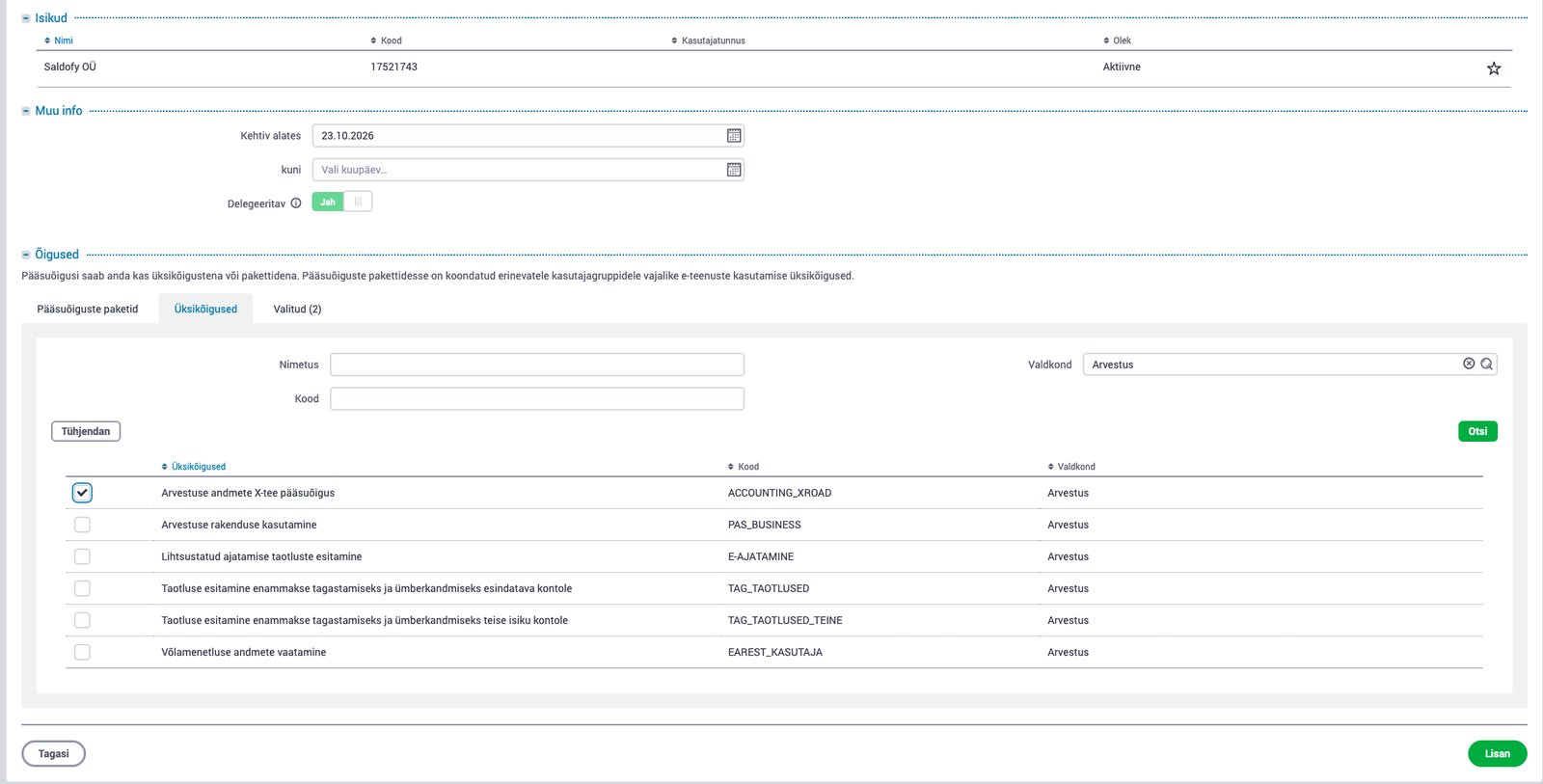
To send directly, a company representative grants Saldofy's X-tee security server owner an access right in e-MTA under Settings → Access rights → Representatives' access rights (in e-MTA: Seaded → Pääsuõigused → Esindajate pääsuõigused). The package "Masin-masin liidese volituse pakett (KMD, TÖR, TSD)", code XT_MM, covers the TSD and also the VAT return and the employment register. Once the rights are granted, you click "Confirm delegation" in Saldofy's settings.
The person filing the TSD needs a personal identification code linked to their Saldofy account and confirmed with ID-card, Smart-ID or Mobile-ID, and a valid e-MTA right to the company's returns, such as the accountant package "Raamatupidaja pakett". Without the authorisation, the TSD works with files through e-MTA and every other step stays the same.
Payment month and due date.
The TSD is cash-based: a payment belongs to the return of the month in which the money is actually paid out. September salaries paid on 5 October go into the October TSD. The return is due on the 10th day of the month after the payment, and when that day is a weekend or public holiday it moves to the next working day: the TSD for September 2026 was due on Monday 12 October, and the TSD for December 2026 is due on Monday 11 January 2027.
Before you pay, the payment window shows which month's TSD the payment goes into and warns you when that month's TSD has already been filed and the new payment needs a new version of the return. The TSD list shows each month's due date, status, filing date, the person who filed and how, and flags months that need a correction.
Example: a construction firm's October TSD.
A small construction firm pays six employees their September salaries on 5 October through its bank connection. The same day, the accountant clicks "Send to EMTA" on the "Payments (APA)" tab. Five lines go out, and the sixth shows "Error in Saldofy": the new employee's personal code has not been entered, so that line waits. Once the code is added, the next sending sends only that line, and after EMTA replies all six lines are "Correct".
In October the firm also had taxable entertainment expenses, approved on the Taxable expenses page, and paid a dividend to its shareholder. On 9 November the accountant prepares the month on the "Monthly filing" tab, sends annexes 4–7 with form INF 1 and confirms the return with a file signed with Smart-ID in DigiDoc4 before the 10 November deadline. After EMTA's confirmation, Saldofy posts the tax liabilities, and the "Payments" tab shows how much is still unpaid.
Corrections and parts you add in e-MTA.
When a month's data changes after sending, Saldofy marks the lines as changed and the next sending corrects only those at EMTA. If the month's return has already been confirmed at EMTA, open it for changes in e-MTA before correcting. Saldofy asks for the reason for the correction (code 121), and you then confirm the return again. If only annexes 4–7 changed, prepare the month again on the "Monthly filing" tab.
Some parts Saldofy does not yet build, for example annex 3, annex 8, parts III–IV of annex 7 and income types 723.1 and 723.2. For such a month, set the note "I add data in e-MTA that Saldofy does not compose" on the "Monthly filing" tab: you send Saldofy's annexes to EMTA, add the missing data in e-MTA, confirm the return there and mark the month as filed in Saldofy. TSDs for September 2026 and earlier months, filed in the old format, are corrected in e-MTA.
How the TSD connects to payroll, the ledger and the bank.
When EMTA has accepted the return, or you mark a month filed in e-MTA as filed in Saldofy, Saldofy freezes the filed figures and posts the payroll taxes as tax liabilities in the general ledger. The liability is dated on the day EMTA's claim arises: the TSD due date, or the filing date if the return was filed later. If EMTA confirmed different totals from those Saldofy filed, no entries are made until the difference has been reviewed.
On the "Payments" tab, you pay the TSD balance through a bank connection with EMTA's reference number using "Pay now", or save a payment order for the due date using "Pay later". A payment made elsewhere is linked with "Link a bank payment", and the "Tax prepayment account" block shows which returns are still uncovered. If a payslip or taxable expense in a filed month changes after filing, the menu shows a mark next to the TSD and the TSD page compares the filed totals with the current ones.
TSD pricing.
Preparing and filing the TSD is part of Saldofy payroll, not a separate add-on. The permanently free Saldofy Free plan includes payroll and the TSD for a small number of employees; the exact limit is on the price list. With more employees, choose a plan with no limit on payroll employees, such as Saldofy Growth (€29/month + VAT).
See also related topics.
Explore other Saldofy topics that may fit your company's workflow.

More guides
Last updated
Sources and further reading
Frequently asked questions.
No. EMTA does not accept that format for payments made from October 2026, so Saldofy builds a data-based file for payments. TSDs for September 2026 and earlier months are filed and corrected in e-MTA and marked as filed in Saldofy.
Yes. On the TSD page, "Build the e-MTA file" creates the payment file, which you upload in e-MTA under the TSD, followed by the annex file. Once EMTA has accepted the data, you confirm the return in e-MTA and mark the month as filed with "I filed it in e-MTA" on the "Monthly filing" tab. Saldofy then posts the tax entries and remembers what EMTA holds, so the next file contains only changes.
No. You can send payments several times during the month, for example right after payday and again after a final settlement. Each time Saldofy sends only new, changed and cancelled lines. The due date is still the 10th of the following month, and the month's return must still be confirmed separately.
No. Payment lines remain data until the company or its accountant confirms the month's return. In Saldofy you do this on the "Monthly filing" tab: download the confirmation file, sign it in DigiDoc4 with an ID-card, Smart-ID or Mobile-ID and upload it. Alternatively, you confirm the return in e-MTA and mark the month as filed in Saldofy.
The line shows EMTA's message and the rule it breaks. Fix the cause in Saldofy, for example the employee's details or the payslip, and send again: the corrected line goes to EMTA as a change. A line with an error in Saldofy itself waits while the other lines go ahead.
Open the month's return for changes in e-MTA and correct the data in Saldofy. Then send the changes on the "Payments (APA)" tab or prepare the month again: Saldofy asks for the reason for the correction (code 121) and sends only the differences. Finally, confirm the return again.
Annexes 1 and 2 come from payslips as the data-based TSD, annexes 4–6 from the register of taxable expenses, and annex 7 and form INF 1 from the dividends module. Parts Saldofy does not yet build, for example annex 3, annex 8, parts III–IV of annex 7 and income types 723.1 and 723.2, are added in e-MTA. The month note "I add data in e-MTA that Saldofy does not compose" then moves the confirmation to e-MTA.
Yes. The Saldofy Free plan includes payroll and TSD filing up to the number of employees shown on the price list, with no time limit. When your team grows, you change plan and all existing payroll and return data stays in place.
Build your next TSD from approved payroll.
In a demo we walk through one payroll month: payslip, payment, sending payments to EMTA, annexes and confirming the month. With a small team you can also start right away on the free plan.