- split shelves or product groups between counters so that two people never count the same item at the same time
- mark counted shelves or areas so that nothing is skipped or counted twice
- before the count day, test the phone or handheld scanner on your own labels with a few items from each product group
- in Saldofy one stock count holds up to 2,000 articles; for a larger catalogue, select articles and create several counts
How to conduct stocktaking: count the stock and post the differences.
To conduct stocktaking, agree on the scope and the moment of the count, enter every stock movement up to that moment, count the goods without seeing the system quantity and investigate large differences before you approve them. Only then post each difference as a stock adjustment, which also changes the inventory account in the general ledger. Below, each step is explained with the common mistakes and how the same work is done in Saldofy.
If you are looking for software that keeps the count, the stock adjustment and the entry in one place, see Saldofy stocktaking software.
What stocktaking is and why it matters.
Stocktaking compares the goods physically in the warehouse with the quantities in your inventory records. A difference can mean loss or theft, but just as often a document that was never entered, a wrong unit or goods that ended up in another warehouse. Without a count, the records carry these errors from month to month, and the cost of sales, the inventory value on the balance sheet and reorder suggestions all rest on wrong quantities.
For the accounts, stocktaking is not only warehouse work. Every shortage reduces the inventory account and increases expenses; a surplus does the opposite. The Estonian financial reporting guideline RTJ 4 “Inventories” requires inventories to be reviewed critically at the end of each reporting period, and names a physical count that found spoiled or deteriorated goods as one reason to consider writing them down.
1. Plan the scope, the timing and the people.
First decide what you will count: the whole warehouse, one product group or only the problem items. A full count suits the end of the year and a warehouse move. A partial count suits expensive or fast-disappearing goods that are worth counting more often. If the company has several warehouses, count each one separately, because the difference has to reach the balance of that specific warehouse.
Decide who counts, who checks and who completes the count. Good practice is that the person who completes it is not the same person who counted the goods alone. Many companies write their stocktaking procedure into their internal accounting rules: how often to count, who takes part and which difference triggers a recount.

2. Enter every document before the count.
A count is reliable only when the records and the shelf describe the same moment. Before counting starts, enter every goods receipt that has already arrived, every delivery note issued, sales, returns and transfers between warehouses. Goods that are on the shelf but whose receipt has not been entered otherwise look like a surplus. If the same receipt is entered after the count, the goods are in stock twice and have to be corrected with a stock-out document.
Agree on what happens to goods that arrive during the count. The simplest option is to keep them aside and receive them after the count is completed. Negative stock usually signals a receipt that was never entered: in the Saldofy POS stock view you can start a separate negative-stock check from those lines.
Saldofy compares the counted quantity with the stock at the moment of completion and posts the difference on the date of the count. That date has to fall in an open period: Saldofy does not write a stock adjustment into a closed inventory month or a locked accounting period.
3. Count blind: do not show the expected quantity.
When a counter sees the system quantity on paper or on screen, they tend to confirm it, especially at the end of a long day. A blind count means the counter sees the product but not how many there should be. They count what is on the shelf, and the difference only appears in the summary.
In a Saldofy stock count the system quantity and the difference stay hidden until the count is completed. The counter sees the product name, its code and their own quantity, and the Counted column shows when the line was last counted. Before completing, the person who completes the count can compare the counted quantities with the stock levels view and have lines with large gaps counted again, without the counter seeing the expected figure.
4. Count with a phone or a handheld scanner.
Counting by barcode is faster and lowers the risk of choosing the wrong line. In the Saldofy mobile app you choose the active warehouse and the open count. You read barcodes with the phone camera or with the trigger of a Zebra or Honeywell handheld in the same app; no separate warehouse app is needed. A line is found only when the item code or barcode matches exactly, so a product with a similar name never lands on the wrong line by accident.
In the quantity form, “Confirm counted quantity” replaces the line's quantity and “Add to counted” adds the entered amount to what has been counted so far. When you count item by item, turn on “Every scan = +1”: each scan adds one unit for piece goods and the label quantity for goods with a weight label. The list shows the most recently counted lines first, and the “Uncounted only” filter shows what is still left.
When two people count the same line on different devices, their quantities are not added together automatically: each device sends the line's final quantity. If someone has recounted the line with a different quantity in the meantime, the newer count stays and Saldofy asks you to check the quantity. That is why products should be split between counters. If the connection drops in the warehouse, the counted quantity waits in an encrypted queue on the phone and is sent again once the connection is back. Completing the count needs a connection.
5. Pallets, boxes and single items.
Wholesale stock is often partly boxed and partly loose. The most common mistake is to count the number of boxes and enter it as pieces. Before the count, agree on the unit in which quantities are entered and check on the item card how many pieces a box holds.
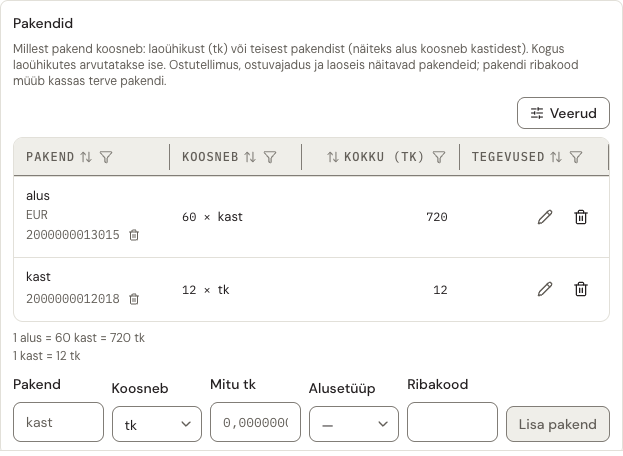
When the packs of an item are defined in Saldofy, for example a box of 12 pieces and a pallet of 60 boxes, you can enter each level separately in the web view: pallets, boxes and loose pieces. Saldofy turns them into the line quantity in the stock unit, so the difference does not depend on how the goods were counted. In the POS stock view, scanning a box barcode converts the number of boxes you enter into pieces.
6. When the shop or warehouse stays open.
You do not always have to close for a count, but then movements have to be taken into account. If an item is sold after its shelf was counted, the counted quantity is already out of date. On completion, Saldofy lists the products whose stock in the same warehouse has changed since the count was started and asks for confirmation.
Go through that list. If you counted a product before it moved, count it again and save the new quantity. If many products have moved, it is easier to cancel the count and start a new one: cancelling keeps the entered quantities in the history but changes neither stock nor the general ledger.
7. Investigate differences before you approve them.
A large shortage does not always mean a loss. Most differences come from a document or a unit. Before a difference is posted, check the larger lines with these questions:
- are the goods in another warehouse, on another shelf or still in the receiving area
- is a purchase invoice, goods receipt or delivery note missing or entered with the wrong date
- was the quantity entered in boxes when the line is in pieces, or the other way round
- have similar items (another size, colour or pack) been mixed up
- are a surplus on one item and a shortage on another almost equal, which points to a swap
- was the item sold or returned after its shelf was counted
Count lines with a large gap a second time, preferably by a different person. Saldofy does not let you complete a count until every line has been counted, so an uncounted line never silently becomes zero. If the product really is not there, enter 0 as the counted quantity. Write the explanations into the count's description or a separate note, so that you can show them at the end of the year.
Write-off or stocktake difference?
When the cause is known, write the goods off with a separate document before the count: broken, spoiled or expired goods. The reason is then on the document, and the stocktake difference shows only what nobody could explain. If every loss is left to the count, known damage and unknown shrinkage merge into one number, and next year it is hard to say where the losses come from.
In Saldofy you write goods off with a “Stock out” document and choose “Write-off” as the outflow kind. A known quantity error is corrected with the “Adjustment” kind of the same document. Write-offs can also be made in the mobile app. In the accounts, both a write-off and a stocktake shortage move value from the item's inventory account to its cost of goods sold account, so the difference lies in the document and the reason, not in the account.
What happens in the general ledger.
When a count is completed, Saldofy creates a stock movement for every line with a difference: an incoming adjustment for a surplus and an outgoing adjustment for a shortage. Each movement has an entry between the item's inventory account and its cost of goods sold account. A surplus is valued at the item's average cost and a shortage with the item's cost formula (FIFO or weighted average). Lines without a difference stay in the count's history without an entry.
An example. A small hardware shop counts its boxes of screws. The records show 140 boxes, the shelf holds 132. The shortage is 8 boxes at a cost of 2.50 per box, so 20.00 is debited to cost of goods sold and credited to inventory. A second line shows a surplus of 3 packs of wall plugs at a cost of 1.20: inventory is debited and cost of goods sold credited with 3.60. In total, the inventory value on the balance sheet falls by 16.40 and the period's expenses rise by the same amount.
A completed count can no longer be changed. If the result later turns out to be wrong, make a new count or a stock document. Cancelling a count that is still in progress changes neither stock nor the general ledger.
The year-end count and the annual report.
The inventory line on the balance sheet shows the goods on the last day of the financial year, so it makes sense to do a full count as at that day. The cleanest option is to count on the last working day of the year after trading ends. If the count slips a few days into the new year, enter all movements of those days before counting. Saldofy compares the counted quantity with the stock at completion and posts the difference on the date of the count, for example 31 December. In the stock levels view you can later pick an earlier date and see the stock at the end of the year.
After the count, review slow-moving and damaged goods. Under RTJ 4, inventories are carried on the balance sheet at the lower of cost and net realisable value, and a write-down is an expense of the reporting period. A write-down has to be considered when the count found spoiled goods, the market price of similar goods has fallen or goods have not sold for a long time. The Saldofy “Aging & turnover” report is a good starting point. The count corrects quantities; how far to write the value down and how to book it is the accountant's decision.
Finally, compare the inventory value with the general ledger. Saldofy “Inventory reconciliations” calculate the inventory value and the balances of the inventory accounts at one point in time and show the differences by product and by account. The resolution of a difference, or a justified exception, is stored as a history that cannot be changed. “Inventory closing” recalculates the month's cost in date order and locks the month's stock documents. That way the inventory line in the annual report is a figure backed by a count, the entries and a reconciliation.
Common stocktaking mistakes.
These mistakes come up in a small shop and in a wholesale warehouse alike. Most of them are prevented by a procedure agreed once and followed at every count:
- the system quantity is visible to the counter, so the count turns into confirmation
- a goods receipt has not been entered, so the goods look like a surplus
- an uncounted line is set to zero without checking the shelf
- boxes are entered as pieces, or the other way round
- two people count the same item and each thinks their quantity is the whole stock
- known damage stays inside the stocktake difference instead of a write-off
- the count is dated in a period that is already locked
- differences are posted, but nobody investigates why they arose
Stocktaking in Saldofy at a glance.
This is how the same work runs in Saldofy. Counts from the web, the mobile app and the POS stock view all reach the same stock count.
- In the web app open Warehouse → Stock Counts, choose the date, the warehouse and the scope: all stock articles or selected stock articles.
- Counters open the count in the mobile app or on the web and enter quantities line by line.
- In the POS stock view a manager can start a partial count from the products currently visible and count them at the till.
- Once every line is counted, press “Complete count” and review the list of moved products if Saldofy shows one.
- Completion creates the stock adjustments and entries; only now do you see the system quantity and the difference for each line.
- Check the result with an inventory reconciliation and close the inventory month.
Sources and further reading
Related product views.

More guides.
See a count run on your own warehouse.
In a demo we walk through counting on a phone, completing on the web and the entry the difference creates. We also show how the year-end count and the inventory reconciliation fit together.