Automated accounting: what the software does on its own and what you check.
In Saldofy, automated accounting means the bank statement arrives by itself, each incoming payment finds its invoice by reference number, AI reads purchase invoice details from a PDF or photo and the journal entry is built from the document. Decisions with a tax effect stay with a person, and the software shows clearly what needs review.
Where automation really saves time.
Business owners usually put it like this: "I wish the bookkeeping would do itself." In practice the time goes into three repetitive jobs: downloading the bank statement, matching incoming payments to invoices and retyping purchase invoices. In a small Estonian company the same person often sells, issues invoices and keeps the books, and the start of each month can take a day or more. Saldofy takes over those three jobs and builds every journal entry from its document, so correcting the document also corrects the entry.
At the same time the software does not guess where a mistake costs money. Saldofy does not match a payment to an invoice on amount, date or payer name alone, because such matches turn out wrong too often. It relies on rules that can be explained: the reference number (viitenumber), an invoice number in the payment description and the exact amount. Everything else is left for you to decide.
A purchase invoice from inbox to payment.
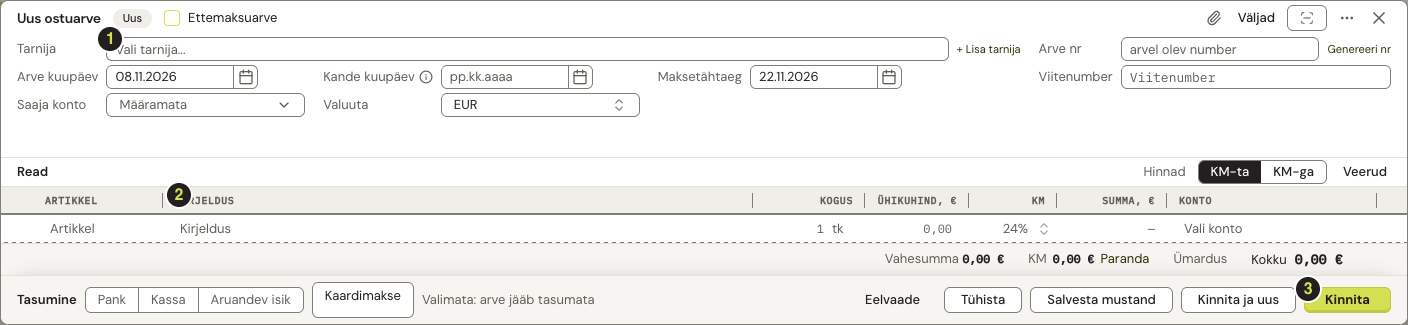
The invoice arrives on the "Incoming bills" page: as an e-invoice through an operator, from the company mailbox through e-mail import, uploaded as a PDF or photo, or photographed in the mobile app.
AI reads the supplier name, registry code, VAT number (KMKR), IBAN, invoice number, dates, lines, VAT rates and amounts. The check digits of the registry code, VAT number, IBAN and reference number are verified, and so is the VAT arithmetic.
The supplier is found by registry code or VAT number. If the same supplier's invoice number already exists, the document is flagged as a possible duplicate.
The expense account, VAT rate and cost centre come from your purchase invoice rules or from the same supplier's previously confirmed invoices. "Remember" next to a line turns your choice into a rule.
You review the pre-filled invoice next to the original and confirm it. If the approval round is switched on, the chosen colleagues approve the invoice first.
The bank row finds the invoice by reference number. A confirmed match marks the invoice as paid and posts the payment entry.
What runs automatically in Saldofy.
Bank statements
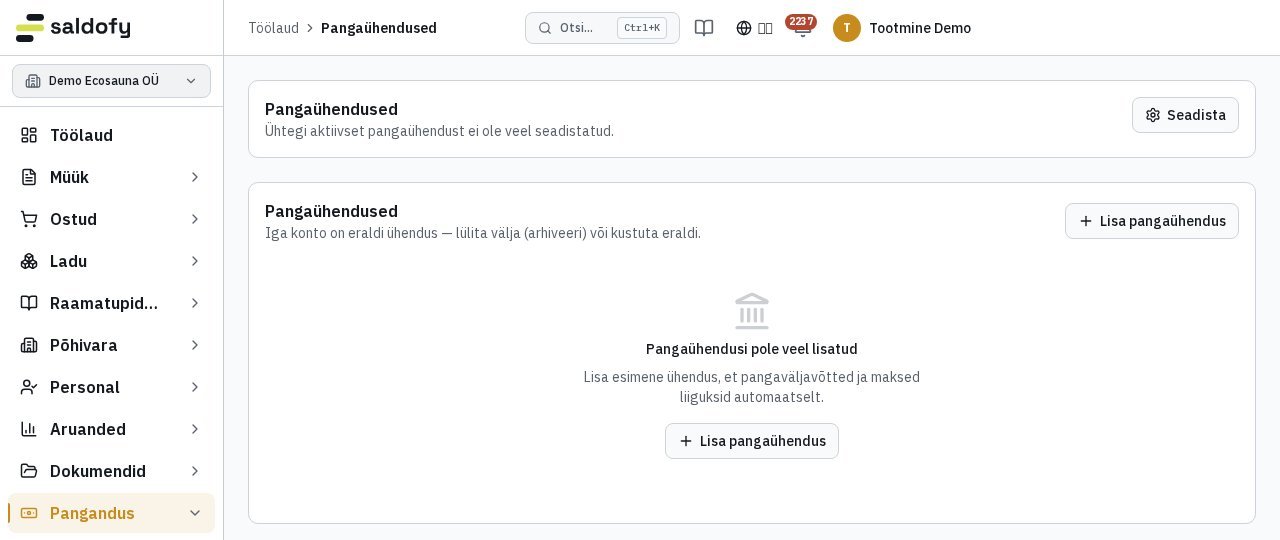
LHV Connect and Coop Pank have direct connections: the balance and new rows arrive when you open the bank page and during the nightly job. For other banks you import a camt.053, MT940 or CSV file, and statements from Wise, Revolut and Paysera are supported too. On a directly connected account Saldofy checks that the bank's opening balance plus the imported rows equals the closing balance, and tells you when something is missing.
Bank transaction matching
An exact reference number and an exact amount give a firm match. When the amount differs, or the description holds an invoice number instead of a reference number, Saldofy suggests a match and waits for your decision.
Booking rules
Bank rows without a document, such as a bank fee or a loan repayment, can be described with a rule. The rule marks new rows on every import, and they reach the ledger after a preview with the "Post by rules" button. When you post a bank row, "Remember this posting" creates a rule that sends the same counterparty's payment to the same account in future.
Purchase invoice recognition
PDF, JPEG, PNG and WebP files become a pre-filled purchase invoice. If a check digit fails, the VAT arithmetic does not add up or the total cannot be found, the invoice is marked as incomplete and flagged for checking.
The same invoice every month
When the approval round is on and a supplier's invoice has the same lines in the same order as that supplier's last confirmed invoice, Saldofy creates the purchase invoice itself after the last required approval, using the previous invoice's accounts and VAT. The duplicate, period and amount checks still apply.
Recurring invoices
A sales invoice is created every week, month, quarter or year. With automatic sending, the recurring invoice is confirmed, posted to the ledger and e-mailed to the customer; without it, the invoice stays a draft for you to review before sending.
Scheduled jobs
Payment reminders go to the customer 1, 7 and 14 days after the due date by default, and both the schedule and the wording can be changed. Fixed asset depreciation and expense periodisation are posted on the first day of the month for the previous month. European Central Bank exchange rates are loaded every day.
Entries come from documents.
In Saldofy the document is the source of truth and the journal entry is derived from it. A confirmed sales invoice, purchase invoice, payroll run, till daily summary and inventory document all post to the ledger under the same rule: debits must equal credits and a locked period is never changed. When you correct a document, the old entry is removed and a new one is made, so you never have to hunt down and fix the entry by hand.
The VAT return follows the same principle: KMD (the Estonian VAT return) data is collected from confirmed documents, not from a separate spreadsheet. A bank row without a document carries no VAT, because the VAT would then not reach the return correctly. A purchase with VAT is entered as a purchase invoice and linked to the bank row.
Manual bookkeeping or Saldofy.

Where manual work takes time and what Saldofy does instead.
How bank matching decides.
An Estonian invoice almost always carries a reference number, and that is the main matching key. If the reference number and amount agree exactly, the row gets a firm match. If the reference number agrees but the amount differs, for example with a part payment, Saldofy only suggests the link. If there is no reference number but the description names exactly one open sales invoice number and the amount is identical to the cent, that is a suggestion as well. Everything else stays unmatched and waits for you.
A match on its own is not yet an entry. The payment and the ledger entry appear when you press "Confirm match" or "Mark all matched as paid". In the settings you can switch on "Apply high-confidence matches automatically"; it is off by default and, even when on, it applies only to rows with an exact reference number and amount. One payment covering several invoices is linked by hand, and a customer's overpayment can be kept as that customer's prepayment.
Example: a small renovation firm on Monday morning.
A small renovation and finishing firm invoices private customers and housing associations with reference numbers. Its current account is with LHV and the bank connection is set up. On Monday morning the bookkeeper opens the bank page: the nightly job has brought in the weekend's rows. Payments where the payer copied the reference number from the invoice are firmly matched. Two rows are suggestions, because one association paid two invoices at once and one private customer paid part of the amount. The bookkeeper links the first by hand to both invoices, confirms the second as a part payment and has the remaining rows marked as paid.
Invoices for building materials and fuel go to the firm's invoice mailbox and from there, through e-mail import, to the "Incoming bills" page, where AI has already read the lines. Accounts for familiar suppliers come from their earlier invoices. On a new tool shop's invoice the bookkeeper picks the account and presses "Remember". The bank fee goes to expenses through a booking rule after the preview. By the end of the month the sales and purchase invoices are confirmed and the KMD data is collected from the same documents; the bookkeeper reviews and files the return.
Where a person always decides.
A recognised purchase invoice is never posted on its own: it is a pre-fill for you to check, and when confidence is low Saldofy says plainly that the data is incomplete. A booking rule does not confirm the tax treatment, and although the VAT return is compiled from documents automatically, you are the one who files it with EMTA, the Estonian Tax and Customs Board.
Saldofy's general rule is that the first click sends or posts nothing: before sending, posting or filing, the software shows what will happen. Rows imported from the bank are not deleted together with a document, so the bank history stays intact even after corrections.
Which banks connect directly.
The direct connections that work in full today are LHV Connect and Coop Pank: statements arrive by themselves, and purchase invoices and salaries can also be paid through them. Direct connections for Swedbank and SEB are in development; until then you import their statements as files. Statements from Luminor and other banks are imported as files too. Each bank account is a separate connection that can be switched off or deleted on its own.
If your main bank works with files for now, automation still applies: a file import runs the same matching rules and booking rules. The only difference is who brings the statement, the bank or you. With a bank that has no direct connection, you pay invoices with a SEPA payment file that Saldofy prepares and you upload to your internet bank.
Automation and plans.
The bank connection, statement matching, AI invoice recognition and e-invoices are included in the permanent Saldofy Free plan as well. The Free plan is limited by the number of invoices per month and the number of companies per account; it has no public API, and the sales invoice PDF footer carries the line “Generated by Saldofy”. If you have more invoices, choose a paid plan; all plans and limits are on the price list.
See also related topics.
Explore other Saldofy topics that may fit your company's workflow.

More guides
Last updated
Frequently asked questions.
No. Entries are built from documents automatically, but recognised purchase invoices, suggested matches and rows matched by a booking rule wait for confirmation. Saldofy can apply bank matches on its own only when the reference number and amount are exact, and only if you have switched that on in the settings.
LHV Connect and Coop Pank, through a direct connection. Direct connections for Swedbank and SEB are in development. For other banks you import a camt.053, MT940 or CSV statement, and files from Wise, Revolut and Paysera are supported as well.
We do not promise error-free recognition. Saldofy verifies check digits and the VAT arithmetic, lowers its confidence when something does not agree and warns about incomplete data. That is why a person reviews every recognised invoice.
No. An e-invoice received through an operator arrives as structured data, so its lines, amounts and details do not have to be read from an image.
Usually the payer left out the reference number or paid a different amount. Saldofy then suggests a match or leaves the row for manual linking, instead of guessing by amount.
Yes. When you post a bank row, choose "Remember this posting" and Saldofy creates or updates a rule. Purchase invoices use your purchase invoice rules and the same supplier's previously confirmed invoices, so a correction is taken into account next time.
Yes. The bank connection, statement matching and AI invoice recognition are part of Saldofy Free within its volume limits. The limits and the prices of paid plans are on the price list.
Try the automation on your own documents.
Sign up, connect your bank or import a statement and add a few purchase invoices. You will see straight away what the software matches by itself and what it leaves to you.