Retail POS software that keeps sales, stock and accounting together.
Saldofy's retail POS runs in a browser and links barcode sales, returns, promotions and stock levels. The day's receipts are gathered into a daily till report, which becomes accounting entries without anyone retyping figures.
Why the shop till and the stock records drift apart.
In many small shops, sales, goods receiving and bookkeeping live in different places. The till knows what was sold, a stock spreadsheet knows what should be on the shelf, and at month end the accountant receives Z reports and has to split them across accounts by hand. Every copy is a chance for an error: a returned item never makes it back into stock, a promotional price does not match the shelf label, or a cash shortfall only comes to light a week later.
Saldofy POS uses the same product catalogue, warehouses and chart of accounts as the accounting module. The cashier sells as usual, but each sale reduces stock, cost of goods sold is calculated with the FIFO or weighted average method, and the day's summary reaches the general ledger as a posted entry.
A trading day at the till, step by step.
This is how an ordinary day runs when the till, the warehouse and the accounts work from the same data.
At the start of the shift the cashier opens the till with one button using the float left at the previous close; a different opening amount asks for a reason.
Products are added with a barcode scanner, by search or from a favourite button. A pack barcode adds a whole case of units at once.
Promotional, quantity and customer group prices apply in the basket automatically, and each line gets the price that is best for the customer.
The customer pays in cash, by card, with a gift card or with several payment methods at once and gets a paper receipt or an e-receipt.
Returns, partial returns and exchanges start from the original receipt, so the goods go back into stock and sales and VAT are reduced.
At the end of the shift the cashier counts the cash blind: the expected amount is hidden until the count is done, and a difference above the allowed limit asks for a reason.
Closing the last till at the sales point posts the daily till report, which records sales and cost of goods sold by account and VAT rate.
Example: a week at a grocery shop with two tills.
On Monday a small grocery shop with two tills receives a delivery. The manager opens the purchase order that was sent earlier in the till's stock view, scans the goods and records the quantities that arrived; lines that are still missing stay open on the order. On Tuesday the stock view shows, based on the sales rate, that a popular yoghurt will run out in a few days. The manager picks the reorder suggestion and turns it into a draft purchase order for the supplier, which the accountant sees under the same company's purchase orders.
On Friday a customer brings back two packs and wants to exchange one of them. The cashier finds the receipt in the receipt history, makes a partial return and an exchange, and stock and turnover are corrected the same day. In the evening both cashiers close their shifts with a blind count. Closing the second till posts the daily till report, and the next morning the accountant sees the day's sales as one report rather than as a separate entry for every receipt. The shop is fictional.
What the retail POS includes.
Prices and promotions
A price rule applies on chosen dates, weekdays and times of day. Quantity prices, bundle prices and “buy X, get Y” offers are calculated in the basket automatically, and the pricing simulator shows in advance which rule will apply.
Shelf labels and weighed goods
Shelf labels and price posters print on paper or on a label printer. A counter scale connects to the till through Chrome or Edge, and the till reads both the product and the weight from a scale label barcode.
Customers and loyalty
The till handles gift cards, coupons, a loyalty card with bonus points and customer group prices. A customer can be added to the receipt and the receipt sent by email.
Stock tasks at the till
In the till's stock view the manager checks stock levels by warehouse, receives goods against a purchase order, moves goods between warehouses and starts a partial stocktake with a scanner.
Control and permissions
Cashiers switch with a PIN, a large discount or a void needs a manager's approval, and the till can be locked when the cashier steps away. Changes to settings are kept in a log.
Hardware
A USB or Bluetooth receipt printer (test a Bluetooth model first) with a cash drawer, a barcode scanner, a customer display on a second monitor and an integrated Ingenico or SumUp Solo card terminal.
POS with inventory: where stock levels change.
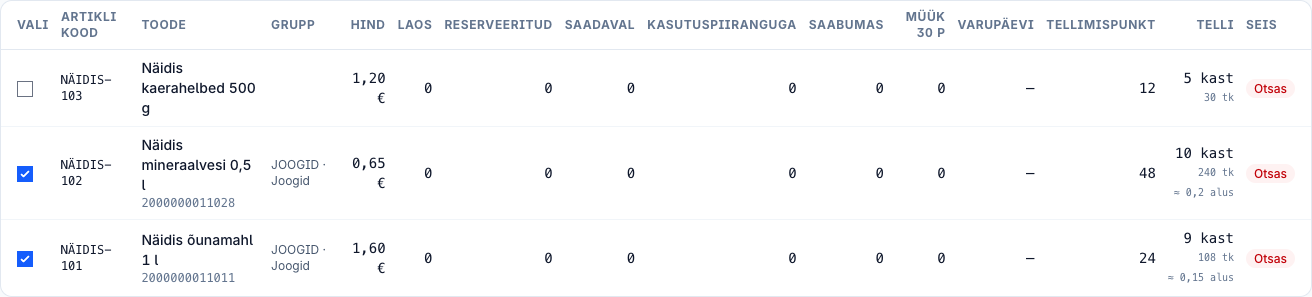
In a Saldofy shop the warehouse is not a separate program or an overnight import. A sale takes the goods out of the sales point's default warehouse at the moment of sale, a return brings them back into the same warehouse, and purchased goods are added to stock when the purchase invoice is posted or, with receipt-based stock switched on, by a goods receipt on the web. At the till you record the arrived quantities of a purchase order by barcode. In the Price and stock view the cashier sees a product's price and stock by warehouse, with reserved and available quantities, without leaving the till.
The sales point's stock rule decides what happens when the records say an item is out of stock: the till warns, asks for confirmation or refuses the sale. The stock view lists items that are out of stock or running low, and the reorder suggestion, based on the sales rate, rounds the quantity up to whole cases when the product's pack size is set. If an item is already on a draft purchase order, the stock view shows that quantity as incoming, so the same goods are not ordered twice.
What the daily till report gives the accountant.
The daily till report is a summary document for one calendar day at one sales point. When it is posted, two entries are created: a sales entry by payment method, revenue account, VAT and cash rounding, and a cost of goods sold entry by expense and inventory account. Goods leave stock at the moment of sale, so stock levels are current throughout the day.
If a receipt made offline syncs later, or a new shift opens on the same day, the lines of the same entry are rewritten and the entry number stays the same. A void never changes a past posted day: it goes into the day of the void as a negative amount, and a return is a negative receipt on the day of the return.
Retail POS for a new shop.
A new shop does not need to start by buying a dedicated till computer or separate till software. When you sign up, choose Point of sale, which starts with a free trial. On the POS setup page a one-click setup button creates a warehouse, a sales point and a till, and you can rename them later. Add products one by one or import them from a file, and create an in-store barcode in the till settings for products that have none.
An existing laptop or an Android tablet with Chrome works as the first till, and receipts can go out by email, so the receipt printer can wait. The Saldofy POS package (€30/month + VAT) includes one till, inventory and accounting. As sales grow, you add tills, sales points and cashiers to the same company, and your sales and stock history stays in place.
Before you go live, check your hardware and network.
The till runs in a modern web browser, but USB and Bluetooth printers and counter scales need Chrome or Edge, and whether they work depends on the model. Printing straight to a network printer is switched off by default in the cloud service. Integrated card payments work with Ingenico (PosXML) and SumUp Solo terminals; with any other terminal the cashier records the card payment in the till by hand.
Selling offline works if the till has been opened online in the same browser before and offline sales are allowed at the sales point. Terminal card payments, coupons, gift cards and some other actions need a server connection, and a shift can only be closed online.
See also related topics.
Explore other Saldofy topics that may fit your company's workflow.

More guides
Last updated
Frequently asked questions.
No. The till runs in a modern web browser on a computer or tablet, and for small sales volumes the phone till in the Saldofy mobile app also works. For printers, scanners and card terminals, check before buying that the model and connection type are supported.
The receipt is the source document, and one day's receipts at a sales point are gathered into the daily till report. Posting it creates a sales entry and a cost of goods sold entry, with payments, revenue and VAT split by account and rate. Till receipts without an invoice flow into the Estonian VAT return (KMD) by VAT rate.
Yes, with a SumUp Solo terminal connected to the till: a void, return or partial return sends the card part back to the card, and a refund that did not reach the terminal can be retried later. With an Ingenico terminal you can currently void the whole payment before the terminal's day close.
Partly. If the till has been opened online in the same browser before and offline sales are allowed at the sales point, ordinary goods can still be sold and the receipts sync when the connection returns. Terminal card payments, gift cards, coupons and closing the shift need a connection.
Each shift closes with a blind count, and the cashier can count a second time if needed. The cash counts tab in POS analytics shows, per cashier, how often the first count did not match and what the final shortage or surplus was.
Yes. Each sales point has its own tills and default warehouse. Sales rules and receipt texts can be set at company level, and each sales point inherits or overrides them; sales reports can be filtered by sales point.
Yes. For an age-restricted product the till asks for an ID check before adding the line and shows the birth date limit to check the buyer's age against. For a product with a deposit, the till adds the deposit line itself, and changing the quantity of the main product or removing it also updates the deposit line.
No. Saldofy POS is a separate paid package with a monthly fee, and each additional till costs extra. Besides the till, the POS package includes accounting and inventory; current packages and prices are on the price list.
See the retail till with your own products.
In a demo we walk through a sale, a return, a goods receipt and the daily till report. POS package and additional till prices are on the price list.